> ## Documentation Index
> Fetch the complete documentation index at: https://docs.twin.so/llms.txt
> Use this file to discover all available pages before exploring further.
# Instructions
> The backend of each agent — auto-generated, fully editable
Twin generates and maintains precise instructions for each agent, so autonomous runs stay on track. You can edit them anytime to keep full control.
Think of instructions as **the backend of each agent** — they define exactly what the agent does, how it does it, which tools it uses, and in what order. Twin writes them automatically during build mode, but you always have the final say.
## How Instructions Work
When you describe a goal to the Orchestrator, Twin doesn't just run it blindly. It generates a **structured set of instructions** that the agent follows on every run.
Twin writes the instructions during build mode based on your goal
Open and modify them at any time to fine-tune behavior
Instructions persist across runs — the agent follows them every time
## Accessing Instructions
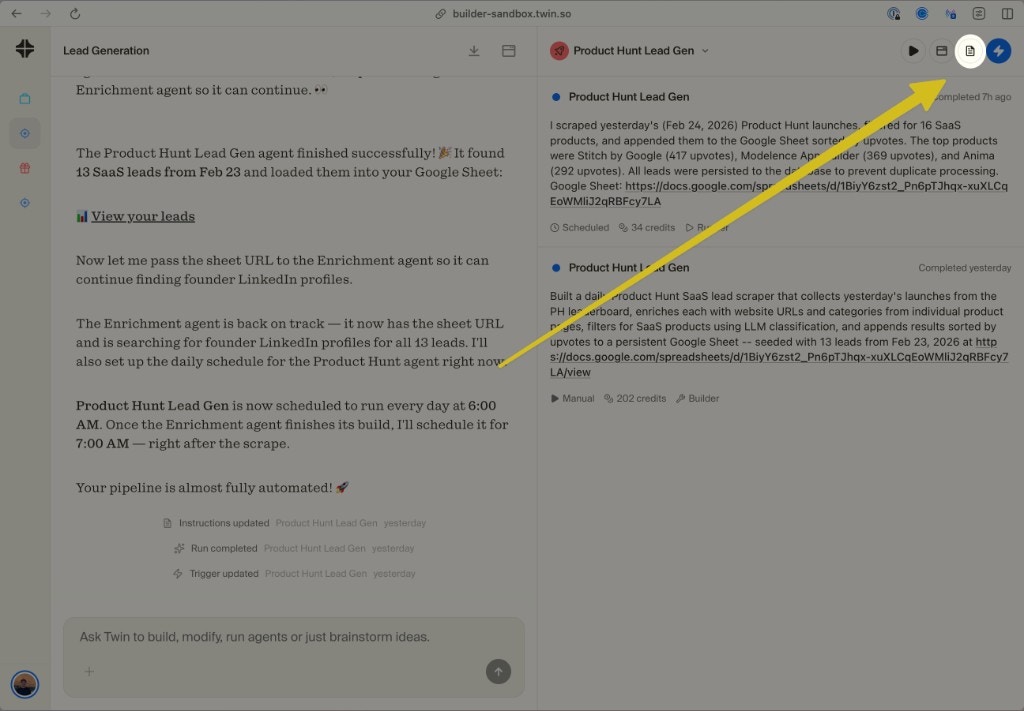
Every agent has an instructions panel you can open to see exactly what it's doing under the hood.
**Step 1** — Click the instructions icon in the top-right corner of an agent's view:
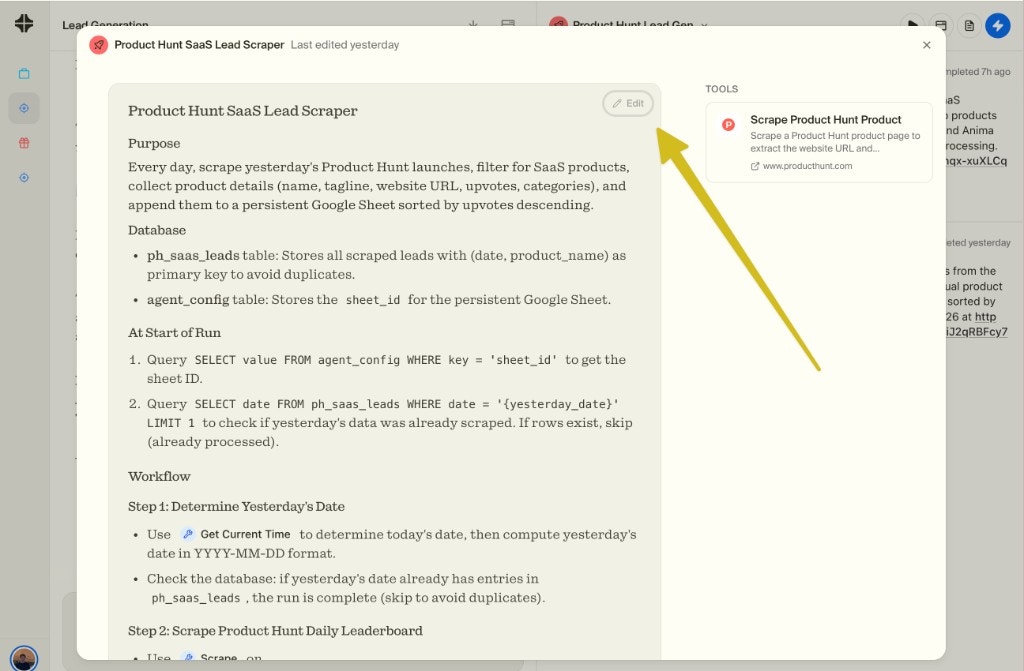
 **Step 2** — The instructions panel opens, showing the full breakdown: purpose, database schema, workflow steps, and tools used.
 ## What's Inside Instructions
Instructions are structured documents that typically include:
| Section | What it contains |
| ------------------- | ---------------------------------------------------------- |
| **Purpose** | A clear description of what the agent does |
| **Database** | Tables and schemas the agent uses to store data |
| **At Start of Run** | Pre-checks before the workflow begins (e.g. deduplication) |
| **Workflow** | Step-by-step execution logic with tools and conditions |
| **Tools** | The specific tools the agent has access to |
## Editing Instructions
You can edit instructions in two ways:
Tell the Orchestrator what to change — "make the agent also extract email addresses" — and it will update the instructions automatically.
Click **Edit** in the instructions panel to modify them by hand. Useful for precise tweaks like changing a filter, adjusting a threshold, or fixing a field name.
Small instruction edits don't require a full rebuild. This is the cheapest way to improve an agent — update the instructions, then run again.
## Why Instructions Matter
Without instructions, every run would be a fresh interpretation of your goal. Instructions ensure the agent behaves the same way every time — even when running autonomously on a schedule.
You can always see exactly what an agent is doing and why. No black box — if something goes wrong, open the instructions to understand the logic and fix it.
Editing instructions is much cheaper than rebuilding from scratch. Update a filter, add a step, or change an output format — all without triggering a full build.
View and edit your agent instructions in Twin
## What's Inside Instructions
Instructions are structured documents that typically include:
| Section | What it contains |
| ------------------- | ---------------------------------------------------------- |
| **Purpose** | A clear description of what the agent does |
| **Database** | Tables and schemas the agent uses to store data |
| **At Start of Run** | Pre-checks before the workflow begins (e.g. deduplication) |
| **Workflow** | Step-by-step execution logic with tools and conditions |
| **Tools** | The specific tools the agent has access to |
## Editing Instructions
You can edit instructions in two ways:
Tell the Orchestrator what to change — "make the agent also extract email addresses" — and it will update the instructions automatically.
Click **Edit** in the instructions panel to modify them by hand. Useful for precise tweaks like changing a filter, adjusting a threshold, or fixing a field name.
Small instruction edits don't require a full rebuild. This is the cheapest way to improve an agent — update the instructions, then run again.
## Why Instructions Matter
Without instructions, every run would be a fresh interpretation of your goal. Instructions ensure the agent behaves the same way every time — even when running autonomously on a schedule.
You can always see exactly what an agent is doing and why. No black box — if something goes wrong, open the instructions to understand the logic and fix it.
Editing instructions is much cheaper than rebuilding from scratch. Update a filter, add a step, or change an output format — all without triggering a full build.
View and edit your agent instructions in Twin