> ## Documentation Index
> Fetch the complete documentation index at: https://docs.twin.so/llms.txt
> Use this file to discover all available pages before exploring further.
# Interfaces
> Build and deploy full apps powered by your Twin agents
Every agent deserves a frontend. Interfaces let you build **full websites and apps** — with sign-ups, databases, and your Twin agents working behind the scenes — directly inside Twin. No external tools needed.
This is a new way to build software: describe what you want, and Twin generates a complete, deployable application with your agents as the backend.
## Why Interfaces
Until now, deploying a Twin agent to users meant integrating via the [REST API](/rest-api) — great for developers, but a barrier for everyone else.
Interfaces change that. Now **anyone** can build and ship a complete app powered by Twin agents:
Dashboards, landing pages, internal tools — fully responsive
User sign-ups, login flows, and per-user data
Full database schemas generated and managed automatically
For technical users, you can still deploy agents via the REST API. Interfaces are for when you want to ship a complete product without writing code.
## How It Works
Start by creating your agent in the Orchestrator as usual. Get it working, test it, deploy it.
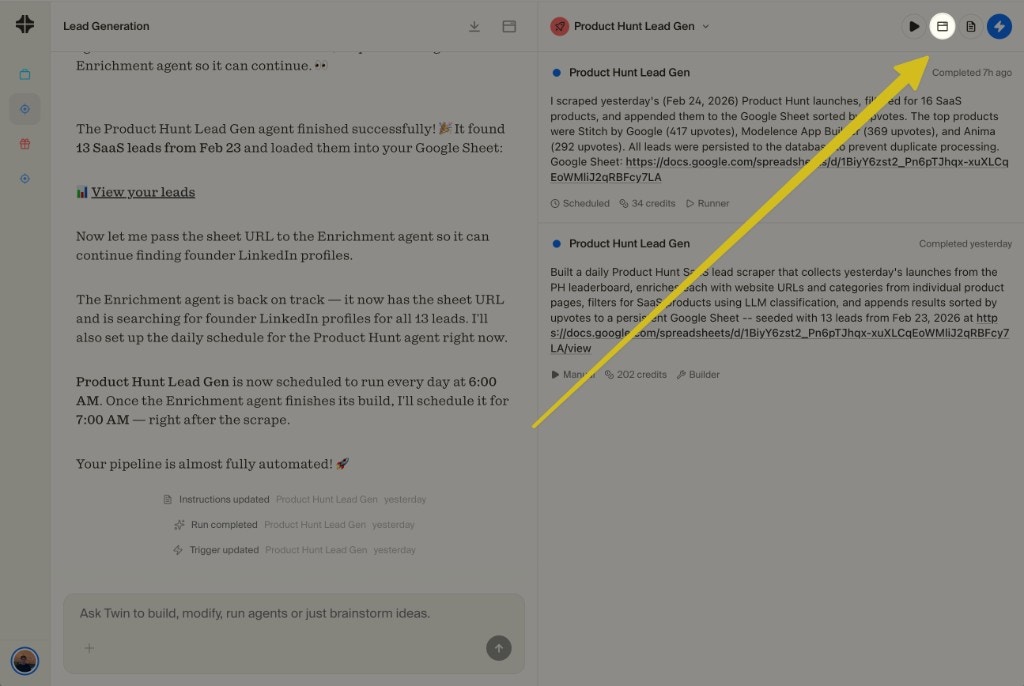
Click the Interfaces icon in the top-right of your agent's view. The Orchestrator will often suggest building an interface at the end of a build — but you can open it anytime.
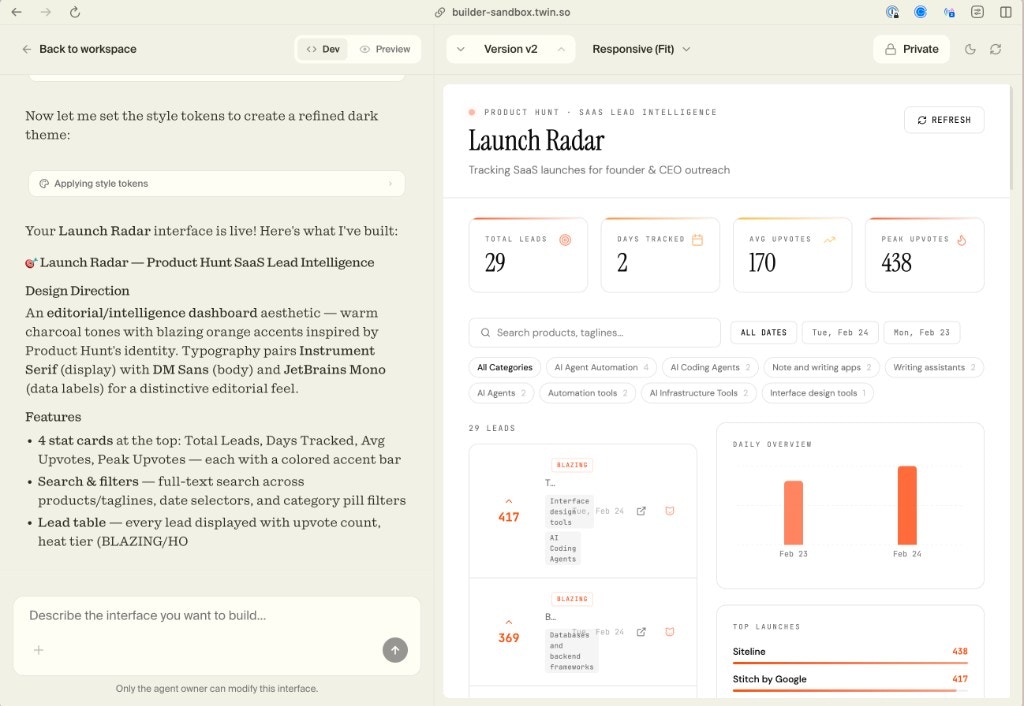
 Use the chat on the left side to describe what you want your app to look like. Twin generates the full frontend — layout, components, styling, interactions — with your agent powering the backend.
See your app live on the right side. Want to change something? Just say it in the chat — "make the table sortable", "add a dark mode", "show a chart for daily trends" — and the interface updates instantly.
Use the chat on the left side to describe what you want your app to look like. Twin generates the full frontend — layout, components, styling, interactions — with your agent powering the backend.
See your app live on the right side. Want to change something? Just say it in the chat — "make the table sortable", "add a dark mode", "show a chart for daily trends" — and the interface updates instantly.
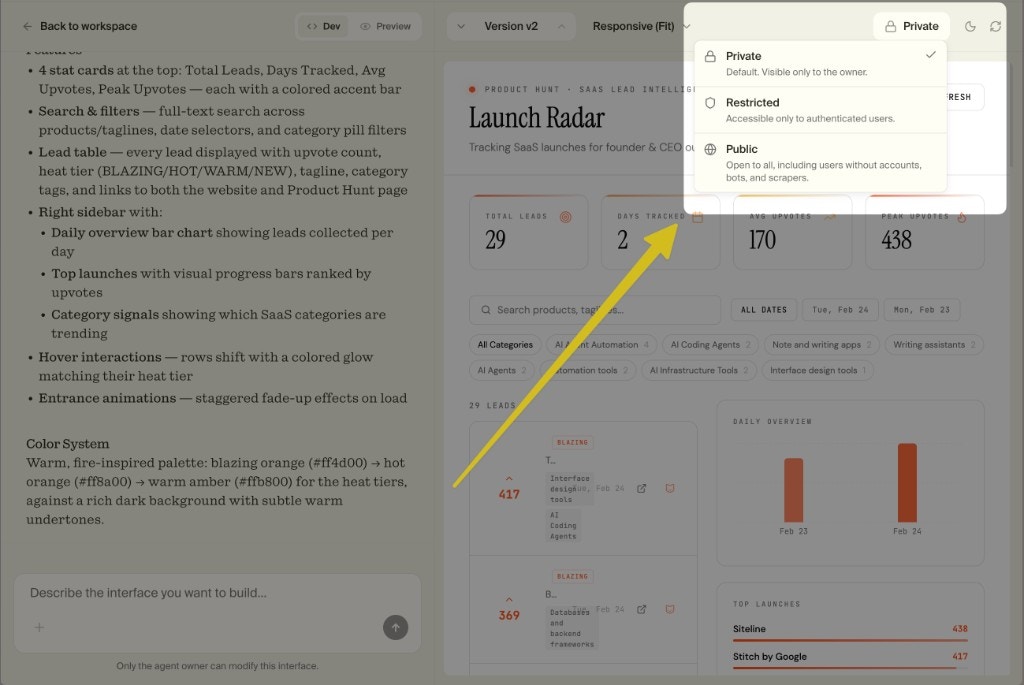
 When you're ready, publish your app online. Choose who can access it: **Private** (only you), **Restricted** (authenticated users only), or **Public** (open to everyone).
 ## Responsive by Default
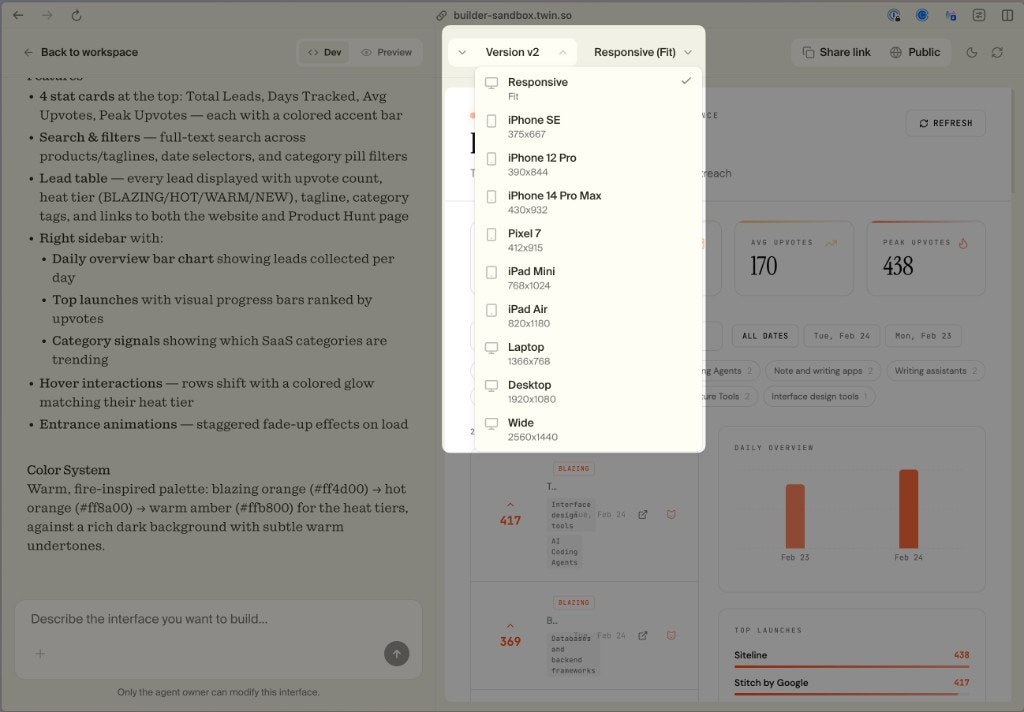
Every interface is responsive out of the box. You can preview how your app looks across different devices — from iPhone SE to wide desktop — using the built-in device picker.
## Responsive by Default
Every interface is responsive out of the box. You can preview how your app looks across different devices — from iPhone SE to wide desktop — using the built-in device picker.
 ## Version Control
Interfaces come with built-in version control. Every change you make is tracked, so you can:
* Switch between versions
* Roll back to a previous state
* Compare what changed between iterations
No git required — it's all managed inside Twin.
## What You Can Build
Build data dashboards that display live results from your agents — lead trackers, competitor monitors, analytics views. Complete with search, filters, and charts.
Build apps with user sign-up, authentication, and per-user data. Let your users interact with your agents through a polished interface you control.
Ship a public-facing tool powered by your agents. Think: a free SEO analyzer, a price comparison tool, or a lead qualification form — all backed by Twin.
Because Interfaces support auth and databases, you can build products you charge for. Your Twin agents handle the backend logic, and the interface handles the user experience.
## Two Ways to Deploy
Build and publish a full app inside Twin. No code, no external hosting. Best for non-technical users or when you want to ship fast.
Integrate your agents into any existing app. Best for developers who want full control over the frontend.
Open Twin and turn your agent into a live app
## Version Control
Interfaces come with built-in version control. Every change you make is tracked, so you can:
* Switch between versions
* Roll back to a previous state
* Compare what changed between iterations
No git required — it's all managed inside Twin.
## What You Can Build
Build data dashboards that display live results from your agents — lead trackers, competitor monitors, analytics views. Complete with search, filters, and charts.
Build apps with user sign-up, authentication, and per-user data. Let your users interact with your agents through a polished interface you control.
Ship a public-facing tool powered by your agents. Think: a free SEO analyzer, a price comparison tool, or a lead qualification form — all backed by Twin.
Because Interfaces support auth and databases, you can build products you charge for. Your Twin agents handle the backend logic, and the interface handles the user experience.
## Two Ways to Deploy
Build and publish a full app inside Twin. No code, no external hosting. Best for non-technical users or when you want to ship fast.
Integrate your agents into any existing app. Best for developers who want full control over the frontend.
Open Twin and turn your agent into a live app