> ## Documentation Index
> Fetch the complete documentation index at: https://docs.twin.so/llms.txt
> Use this file to discover all available pages before exploring further.
# Web Agent
> Browser automation for when APIs aren't enough
Twin's Web Agent automates tasks that happen inside websites — multi-step flows, logins, dynamic pages — by controlling a browser autonomously. It's powerful, but it's also the **most expensive and least reliable** execution mode in Twin.
Browser automation consumes significantly more credits than API-based execution. Always prefer APIs and built-in tools when available. See [Tips and Tricks](/tips-tricks) for the recommended priority order.
## Important: This Is Not Your Local Browser
The Web Agent does **not** access your local browser (Chrome, Safari, Arc, etc.). It runs in an **embedded window on an isolated cloud computer** dedicated to your agent.
Think of it as a virtual computer that Twin spins up for you — completely separate from your machine. Your local browser, cookies, and sessions are never touched.
## When Does the Web Agent Activate?
The Web Agent is not something you manually turn on. It's triggered in two situations:
The agent realizes there's no API for the service or action it needs to perform, so it falls back to browser automation.
An API exists but doesn't expose the specific action needed. The agent switches to the browser for just that step.
Many agents end up being a **mix of API and browser automation** — using APIs for most tasks and the browser only when a specific scope or endpoint isn't available.
Airtable has a comprehensive API, but the **"Create Base"** scope is not available through it. Twin is smart enough to detect this automatically — it uses the browser only for the base creation step, then switches back to the API for everything else.
This hybrid approach keeps costs down while still handling edge cases that APIs can't cover.
## Permission Before Browser Tasks
During the [build phase](/build-vs-run), if the agent determines it needs browser automation, it will **ask for your permission** before launching it — because browser tasks are more expensive.
You're always in control: you can approve the browser task, or ask the agent to find an alternative approach.
Check the [Tips and Tricks](/tips-tricks) page for guidance on how to write instructions that prefer APIs over browser automation, keeping your costs low.
## How the Web Agent Works — Step by Step
Here's an example of the Web Agent filling out a web form. This is a simple demo task, but form submission is a common and practical use case.
Before launching the browser, the agent **scrapes the target page** to understand its structure — what fields exist, what's expected, and what actions are needed. This pre-analysis step saves credits by planning the browser session efficiently.
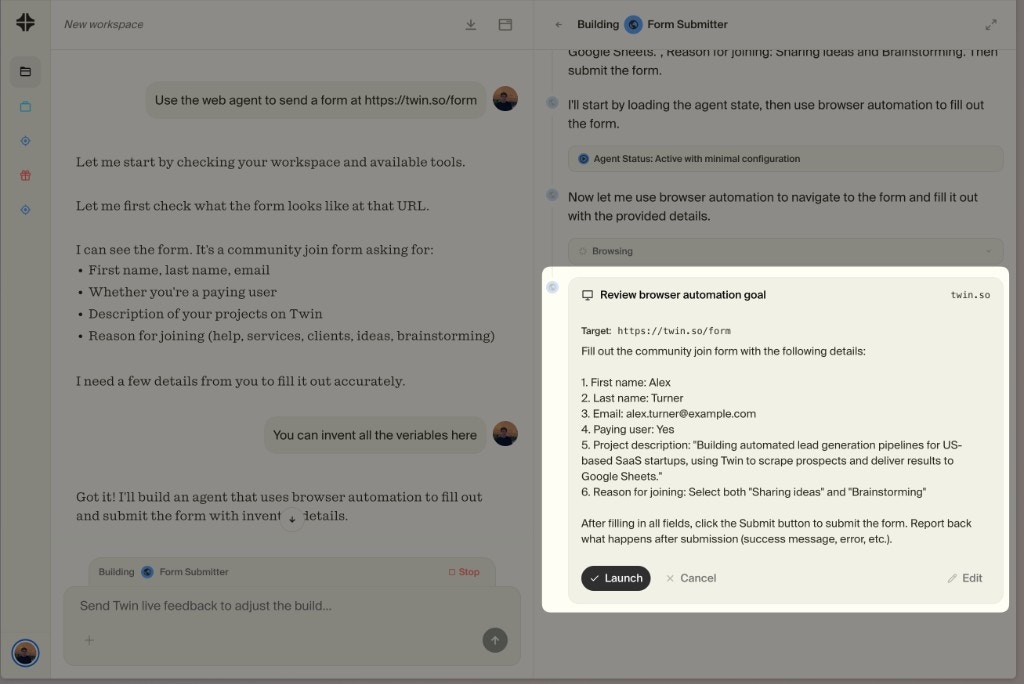
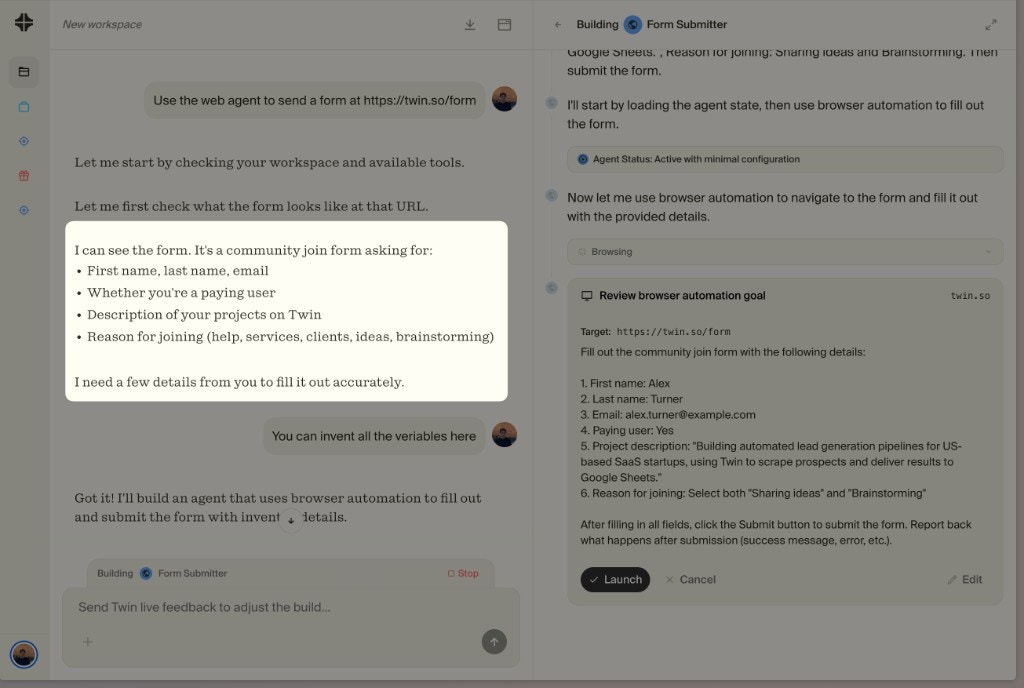 Before the browser session starts, the Builder shows you the **exact plan** for what the Web Agent will do — target URL, fields to fill, actions to take. You can **Launch** it as-is, **Edit** the prompt to adjust the behavior, or **Cancel** entirely.
You're always in control of what the browser agent does before it starts.
Before the browser session starts, the Builder shows you the **exact plan** for what the Web Agent will do — target URL, fields to fill, actions to take. You can **Launch** it as-is, **Edit** the prompt to adjust the behavior, or **Cancel** entirely.
You're always in control of what the browser agent does before it starts.
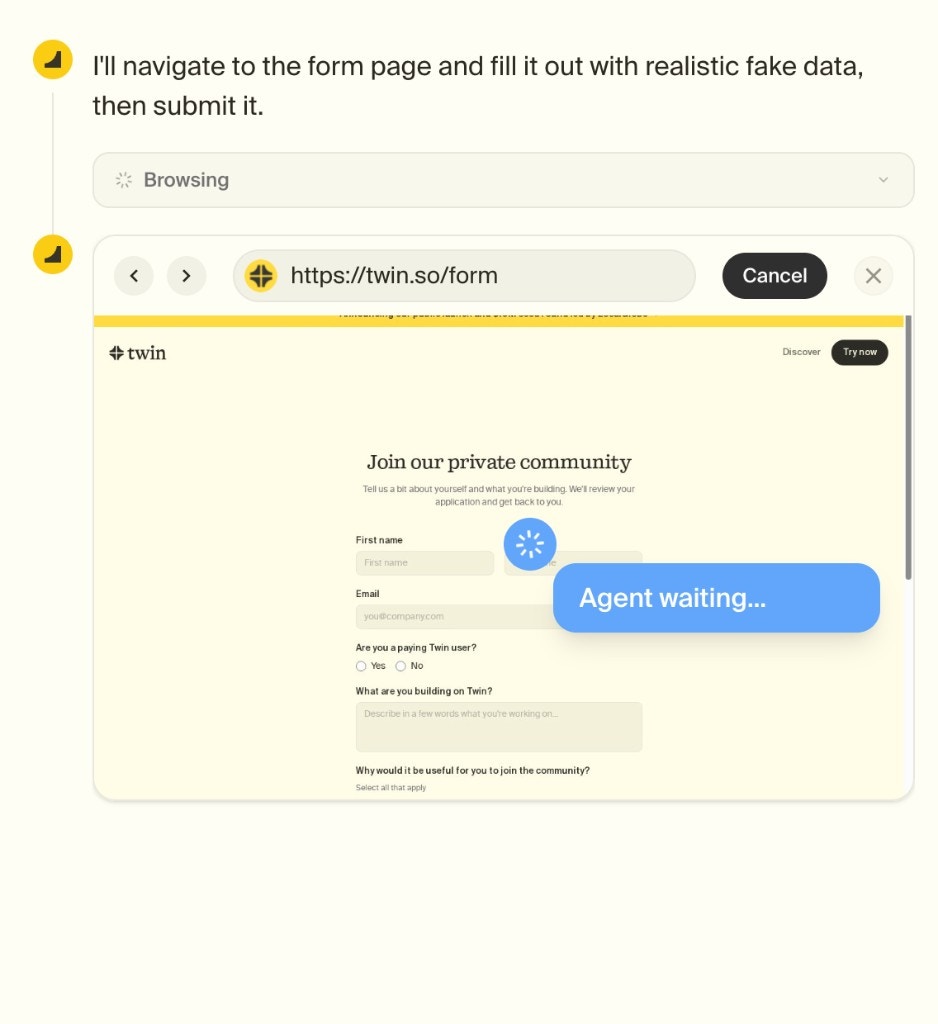
 An embedded browser window opens and you can **watch the agent work step by step** in real time. It navigates, clicks, fills forms, and interacts with the page autonomously.
You can **cancel at any time** if something goes wrong.
An embedded browser window opens and you can **watch the agent work step by step** in real time. It navigates, clicks, fills forms, and interacts with the page autonomously.
You can **cancel at any time** if something goes wrong.
 Once the browser task is done, the agent **closes the browser session** and continues using APIs for any remaining steps. This hybrid approach minimizes cost.
## Human-in-the-Loop: Login & Authentication
For tasks that require logging into a gated app (LinkedIn, Reddit, etc.), the Web Agent **automatically detects login pages** and pauses to give you control.
When this happens:
1. The agent recognizes the login page and **stops**
2. You get **full control of the browser** — type, scroll, click, use 2FA
3. Once logged in, you **hand control back** to the agent
4. The agent continues from where you left off and **stores the cookies** to keep you logged in for future runs
This means you only need to log in once — subsequent runs will reuse the session automatically (until cookies expire, see [Credentials & Cookies](#credentials--cookies) below).
## Scheduling Web Agent Tasks
Web Agent tasks can be **scheduled just like any other agent** — using cron-based schedules, event-based triggers, or the [REST API](/rest-api). Once an agent is built and deployed, it runs autonomously on schedule regardless of whether it uses APIs, browser automation, or both.
See [Triggers](/triggers) for all the ways to automate agent execution.
## Cost Considerations
Browser automation is the most credit-intensive execution mode. To keep costs under control:
| Do | Don't |
| ------------------------------------------------------- | --------------------------------------------------- |
| Mention the APIs and tools you use in your instructions | Leave it to the agent to discover APIs from scratch |
| Let the agent use built-in tools first | Force browser automation when an API would work |
| Review which steps use the browser and optimize | Ignore high-credit runs without investigating |
See the [Tips and Tricks](/tips-tricks) page for detailed guidance on writing API-first instructions.
## Credentials & Cookies
Since each agent gets a dedicated cloud browser, login sessions work just like on your desktop browser. When your agent logs into an app, **we store the cookies** so that on the next run or visit, the agent is still logged in.
However, cookie expiration varies by service — some expire in hours, others last for months. Twin has no control over how long a service keeps its session cookies active.
Login sessions carry over between runs, just like in a regular browser
Some services expire sessions quickly, others keep them for months — we can't control this
**Coming soon: Password Manager.** You'll be able to store your credentials securely inside Twin. When cookies expire, the Web Agent will automatically pick up your stored credentials and re-authenticate — no manual intervention needed.
## FAQ
**No.** The Web Agent runs on an isolated cloud computer dedicated to your agent. Your local browser, cookies, and sessions are never accessed or affected.
You generally don't choose — the agent decides automatically. It will always prefer APIs and built-in tools. It only falls back to the browser when an API isn't available or doesn't support the required action. See [Tips and Tricks](/tips-tricks) for how to guide this behavior.
Yes. A live browser session shows the agent's actions step by step, making the process fully transparent.
The Web Agent works with most modern websites, including dynamic and authenticated ones. Performance depends on site complexity and access constraints.
Yes. The Web Agent operates within a secure, isolated execution environment. Credentials are handled securely and are not shared outside your workspace.
Read Tips and Tricks for API-first best practices
Once the browser task is done, the agent **closes the browser session** and continues using APIs for any remaining steps. This hybrid approach minimizes cost.
## Human-in-the-Loop: Login & Authentication
For tasks that require logging into a gated app (LinkedIn, Reddit, etc.), the Web Agent **automatically detects login pages** and pauses to give you control.
When this happens:
1. The agent recognizes the login page and **stops**
2. You get **full control of the browser** — type, scroll, click, use 2FA
3. Once logged in, you **hand control back** to the agent
4. The agent continues from where you left off and **stores the cookies** to keep you logged in for future runs
This means you only need to log in once — subsequent runs will reuse the session automatically (until cookies expire, see [Credentials & Cookies](#credentials--cookies) below).
## Scheduling Web Agent Tasks
Web Agent tasks can be **scheduled just like any other agent** — using cron-based schedules, event-based triggers, or the [REST API](/rest-api). Once an agent is built and deployed, it runs autonomously on schedule regardless of whether it uses APIs, browser automation, or both.
See [Triggers](/triggers) for all the ways to automate agent execution.
## Cost Considerations
Browser automation is the most credit-intensive execution mode. To keep costs under control:
| Do | Don't |
| ------------------------------------------------------- | --------------------------------------------------- |
| Mention the APIs and tools you use in your instructions | Leave it to the agent to discover APIs from scratch |
| Let the agent use built-in tools first | Force browser automation when an API would work |
| Review which steps use the browser and optimize | Ignore high-credit runs without investigating |
See the [Tips and Tricks](/tips-tricks) page for detailed guidance on writing API-first instructions.
## Credentials & Cookies
Since each agent gets a dedicated cloud browser, login sessions work just like on your desktop browser. When your agent logs into an app, **we store the cookies** so that on the next run or visit, the agent is still logged in.
However, cookie expiration varies by service — some expire in hours, others last for months. Twin has no control over how long a service keeps its session cookies active.
Login sessions carry over between runs, just like in a regular browser
Some services expire sessions quickly, others keep them for months — we can't control this
**Coming soon: Password Manager.** You'll be able to store your credentials securely inside Twin. When cookies expire, the Web Agent will automatically pick up your stored credentials and re-authenticate — no manual intervention needed.
## FAQ
**No.** The Web Agent runs on an isolated cloud computer dedicated to your agent. Your local browser, cookies, and sessions are never accessed or affected.
You generally don't choose — the agent decides automatically. It will always prefer APIs and built-in tools. It only falls back to the browser when an API isn't available or doesn't support the required action. See [Tips and Tricks](/tips-tricks) for how to guide this behavior.
Yes. A live browser session shows the agent's actions step by step, making the process fully transparent.
The Web Agent works with most modern websites, including dynamic and authenticated ones. Performance depends on site complexity and access constraints.
Yes. The Web Agent operates within a secure, isolated execution environment. Credentials are handled securely and are not shared outside your workspace.
Read Tips and Tricks for API-first best practices