> ## Documentation Index
> Fetch the complete documentation index at: https://docs.twin.so/llms.txt
> Use this file to discover all available pages before exploring further.
# Workspaces
> Organize agents that collaborate and share context
Organise agents into workspaces where they collaborate and share context, so you can tackle complex workflows while keeping each agent focused and reliable.
## What Is a Workspace?
A workspace is where your agents live. Every agent in Twin exists inside a workspace — you can't create an agent outside of one.
A workspace can contain a **single agent** or **as many as you need**. When you have multiple agents, they all share the same context — making it easy to build multi-agent workflows where each agent handles a specific part of the job.
Create as many agents as you need inside a workspace
Agents in the same workspace can collaborate and share knowledge
Keep each agent focused on a single task for better results
## The Orchestrator
To create, delete, or modify agents inside a workspace, use the **Orchestrator** — the chat on the left side of the screen.
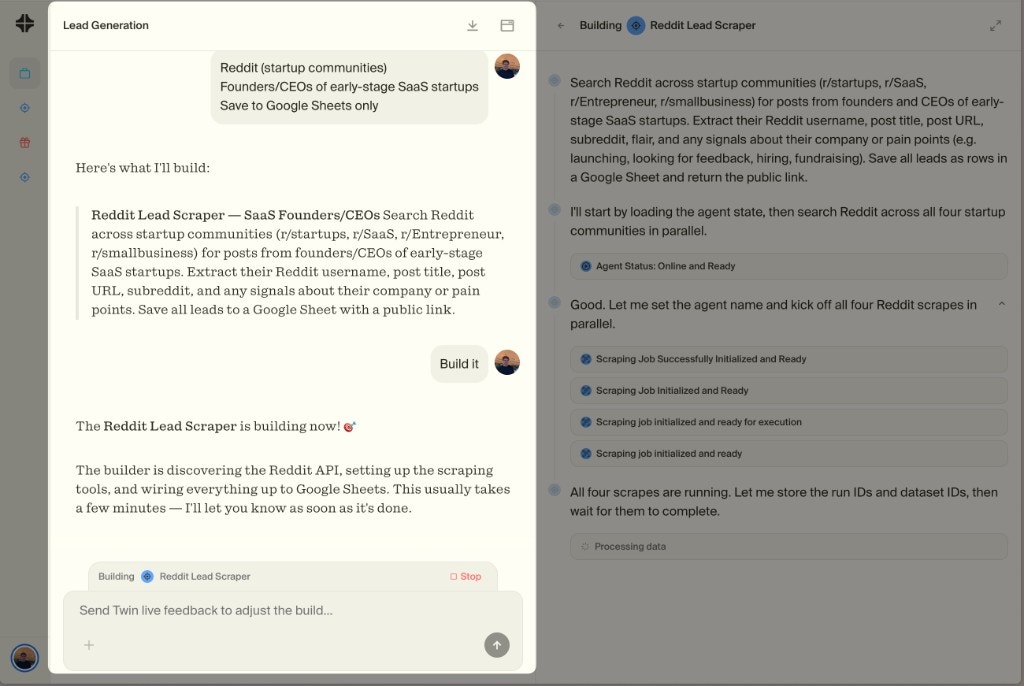 The Orchestrator has full context on everything in your workspace. You can talk to it to:
Describe what you need and the Orchestrator will build a new agent for you
Ask to update goals, change behavior, or add new steps to any agent
Remove agents you no longer need
The Orchestrator knows about all your agents, so it can help you design multi-agent workflows
The Orchestrator is also **proactive** — if it thinks your workflow would benefit from splitting into multiple agents or creating a new one, it will suggest it on its own.
Think of the Orchestrator as the manager of your workspace — it sees everything, can act on any agent, and will propose changes when it spots opportunities to improve your setup.
## Multiple Workspaces
Keep client work, internal tools, and experiments isolated from each other.
Give different teams access to only the agents they need.
Workspaces are currently **independent** — agents in one workspace can't directly connect to or communicate with agents in another workspace.
**Connected accounts are workspace-scoped.** Each workspace can only connect to one account per service (e.g., one X/Twitter account, one Gmail account). If you need to manage multiple accounts for the same service, create a separate workspace for each.
Multi-account management — including managing accounts on behalf of your clients — is coming soon.
However, Twin maintains a **User Memory** that carries context across workspaces. When you create a new workspace, Twin already knows your preferences, tools, and patterns from previous workspaces — so you don't start from scratch every time.
## Get Started
Sign in to Twin and start building
The Orchestrator has full context on everything in your workspace. You can talk to it to:
Describe what you need and the Orchestrator will build a new agent for you
Ask to update goals, change behavior, or add new steps to any agent
Remove agents you no longer need
The Orchestrator knows about all your agents, so it can help you design multi-agent workflows
The Orchestrator is also **proactive** — if it thinks your workflow would benefit from splitting into multiple agents or creating a new one, it will suggest it on its own.
Think of the Orchestrator as the manager of your workspace — it sees everything, can act on any agent, and will propose changes when it spots opportunities to improve your setup.
## Multiple Workspaces
Keep client work, internal tools, and experiments isolated from each other.
Give different teams access to only the agents they need.
Workspaces are currently **independent** — agents in one workspace can't directly connect to or communicate with agents in another workspace.
**Connected accounts are workspace-scoped.** Each workspace can only connect to one account per service (e.g., one X/Twitter account, one Gmail account). If you need to manage multiple accounts for the same service, create a separate workspace for each.
Multi-account management — including managing accounts on behalf of your clients — is coming soon.
However, Twin maintains a **User Memory** that carries context across workspaces. When you create a new workspace, Twin already knows your preferences, tools, and patterns from previous workspaces — so you don't start from scratch every time.
## Get Started
Sign in to Twin and start building