Build and deploy full apps powered by your Twin agents
Every agent deserves a frontend. Interfaces let you build full websites and apps — with sign-ups, databases, and your Twin agents working behind the scenes — directly inside Twin. No external tools needed.This is a new way to build software: describe what you want, and Twin generates a complete, deployable application with your agents as the backend.
Until now, deploying a Twin agent to users meant integrating via the REST API — great for developers, but a barrier for everyone else.Interfaces change that. Now anyone can build and ship a complete app powered by Twin agents:
Start by creating your agent in the Orchestrator as usual. Get it working, test it, deploy it.
Open Interfaces
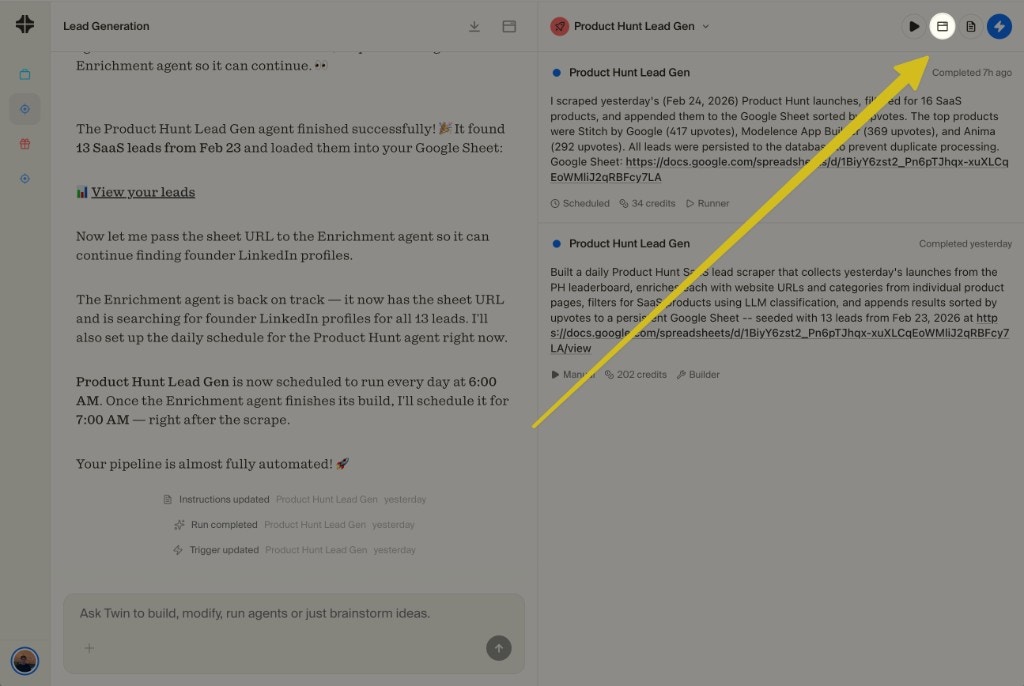
Click the Interfaces icon in the top-right of your agent’s view. The Orchestrator will often suggest building an interface at the end of a build — but you can open it anytime.
Access Interfaces from the icon in the top-right corner of any agent
Describe your app
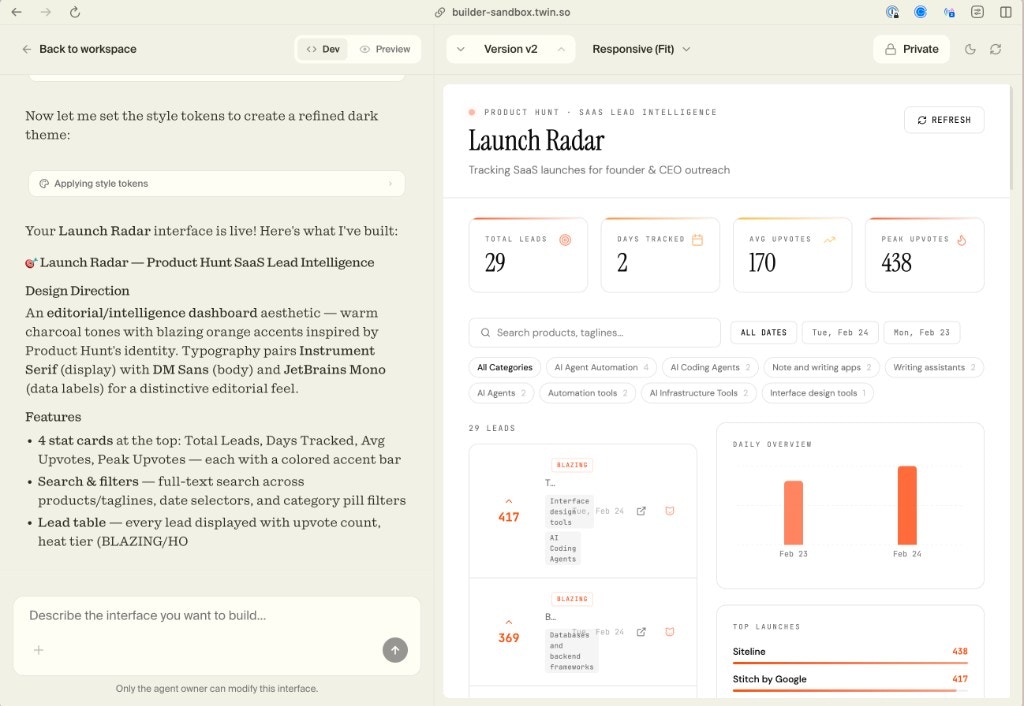
Use the chat on the left side to describe what you want your app to look like. Twin generates the full frontend — layout, components, styling, interactions — with your agent powering the backend.
Preview and iterate
See your app live on the right side. Want to change something? Just say it in the chat — “make the table sortable”, “add a dark mode”, “show a chart for daily trends” — and the interface updates instantly.
A complete dashboard app built with Interfaces — chat on the left, live preview on the right
Publish
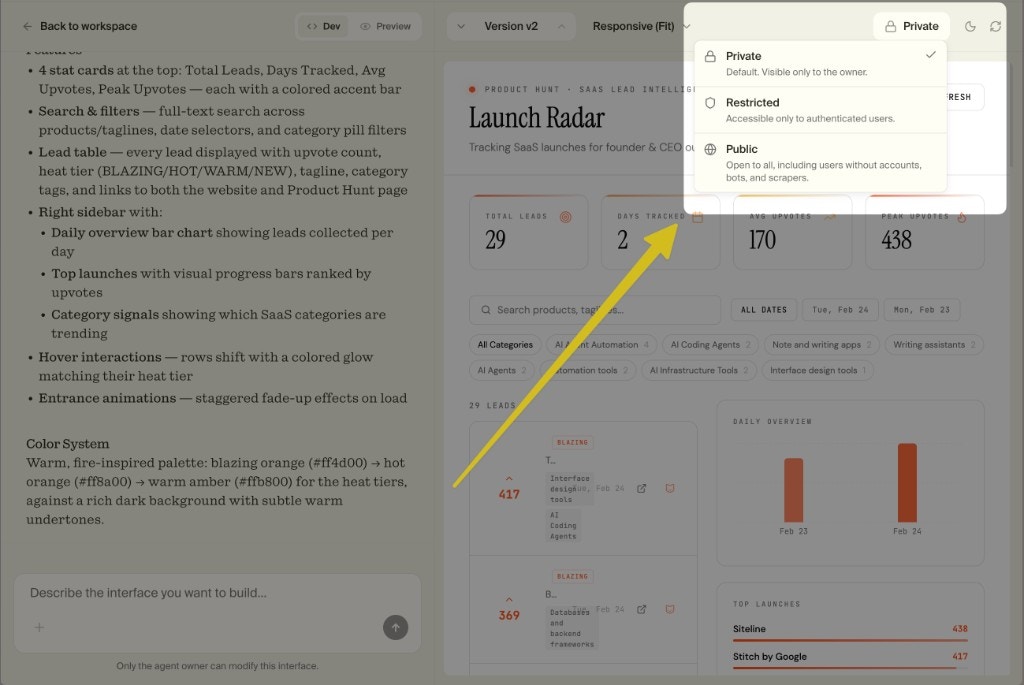
When you’re ready, publish your app online. Choose who can access it: Private (only you), Restricted (authenticated users only), or Public (open to everyone).
Choose your visibility: Private, Restricted, or Public
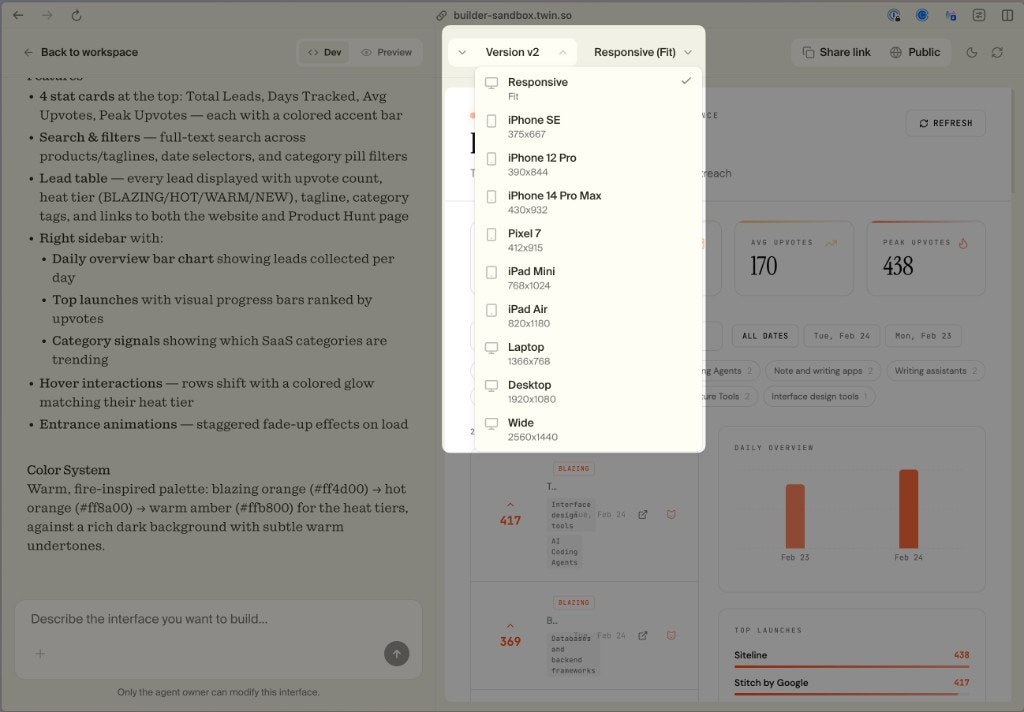
Every interface is responsive out of the box. You can preview how your app looks across different devices — from iPhone SE to wide desktop — using the built-in device picker.
Preview your app on any device size with the responsive picker
Build data dashboards that display live results from your agents — lead trackers, competitor monitors, analytics views. Complete with search, filters, and charts.
Customer-facing apps
Build apps with user sign-up, authentication, and per-user data. Let your users interact with your agents through a polished interface you control.
Landing pages and tools
Ship a public-facing tool powered by your agents. Think: a free SEO analyzer, a price comparison tool, or a lead qualification form — all backed by Twin.
Monetizable products
Because Interfaces support auth and databases, you can build products you charge for. Your Twin agents handle the backend logic, and the interface handles the user experience.
Build and publish a full app inside Twin. No code, no external hosting. Best for non-technical users or when you want to ship fast.
REST API
Integrate your agents into any existing app. Best for developers who want full control over the frontend.
Build Your First Interface
Open Twin and turn your agent into a live app
{"docsConfig":{"$schema":"https://mintlify.com/docs.json","theme":"mint","name":"Twin documentation","colors":{"primary":"#F4D03F","light":"#F5F0DC","dark":"#00231B"},"favicon":"/favicon.png","logo":{"light":"https://mintcdn.com/twinlabs/32bkTaA33ltG-5t7/logo/twin-logo.png?fit=max\u0026auto=format\u0026n=32bkTaA33ltG-5t7\u0026q=85\u0026s=44a91c91c9d1710f45b5b3bcb6525690","dark":"https://mintcdn.com/twinlabs/32bkTaA33ltG-5t7/logo/twin-logo.png?fit=max\u0026auto=format\u0026n=32bkTaA33ltG-5t7\u0026q=85\u0026s=44a91c91c9d1710f45b5b3bcb6525690"},"api":{"playground":{"display":"simple"}},"background":{"decoration":null,"color":{"light":"#F5F0DC","dark":"#1C0A02"}},"navbar":{"links":[{"label":"Support","href":"mailto:hi@mintlify.com"}],"primary":{"type":"button","label":"Get Started","href":"https://builder.twin.so"}},"footer":{"socials":{"x":"https://x.com/twin_labs","linkedin":"https://www.linkedin.com/company/twinso/"}},"styling":{"latex":false},"navigation":{"global":{"anchors":[{"anchor":"Twin App","href":"https://builder.twin.so/","icon":"circle-play"},{"anchor":"Community","href":"https://twin.so/form","icon":"users"},{"anchor":"Give us Feedback!","href":"https://twin.so/feedback","icon":"comments"}]},"pages":[]}},"deployment":{"deploymentMetadataValue":{"subdomain":"twinlabs","hasAudioNarration":false,"actualSubdomain":"twinlabs","customDomains":["docs.twin.so"],"gitSource":{"type":"github","owner":"twin-so","repo":"docs","deployBranch":"main","contentDirectory":"","isPrivate":true,"mountPath":"","label":""},"chroma":{"liveDeploymentHistoryId":"6a21e65194a5dc2e6daf3990","collectionId":"931cb86f-20a2-4054-8d03-ac63c4cb1cb1","schemaVersion":"v2"},"entitlements":{"AI_CHAT":{"status":"DISABLED"},"WEB_MCP":{"status":"DISABLED"},"NARRATION":{"status":"DISABLED"}},"buildId":"6a21e65194a5dc2e6daf3990:success","clientVersion":"0.0.3971","searchFilterCounts":[{"language":"default","tag":"Documentation","count":14},{"language":"default","tag":"Key Concepts","count":7},{"language":"default","tag":"Get Started","count":5},{"language":"default","tag":"Guide","count":2}]},"assistantConfig":{},"basePath":"","hasChatPermissions":false,"hasWebMcpPermissions":false,"toggles":[{"name":"kill-isr","enabled":true,"variant":{"name":"disabled","enabled":false,"feature_enabled":true},"impressionData":false},{"name":"agent-mintlify-slack","enabled":true,"variant":{"name":"disabled","enabled":false,"feature_enabled":true},"impressionData":false},{"name":"editor-v7-file-tree","enabled":true,"variant":{"name":"disabled","enabled":false,"feature_enabled":true},"impressionData":false},{"name":"agent-integrations-settings","enabled":true,"variant":{"name":"disabled","enabled":false,"feature_enabled":true},"impressionData":false},{"name":"automations-pr-grouping","enabled":true,"variant":{"name":"disabled","enabled":false,"feature_enabled":true},"impressionData":false},{"name":"custom-prefix","enabled":true,"variant":{"name":"disabled","enabled":false,"feature_enabled":true},"impressionData":false},{"name":"analytics-v7","enabled":true,"variant":{"name":"disabled","enabled":false,"feature_enabled":true},"impressionData":false},{"name":"user-flows-analytics","enabled":true,"variant":{"name":"disabled","enabled":false,"feature_enabled":true},"impressionData":false},{"name":"no-publish-flow","enabled":true,"variant":{"name":"disabled","enabled":false,"feature_enabled":true},"impressionData":false},{"name":"workos-onboarding","enabled":true,"variant":{"name":"disabled","enabled":false,"feature_enabled":true},"impressionData":false},{"name":"llms-txt-v2","enabled":true,"variant":{"name":"disabled","enabled":false,"feature_enabled":true},"impressionData":false},{"name":"pause-universal-search-reconcile","enabled":true,"variant":{"name":"disabled","enabled":false,"feature_enabled":true},"impressionData":false},{"name":"snapshot-serving-live","enabled":true,"variant":{"name":"disabled","enabled":false,"feature_enabled":true},"impressionData":false},{"name":"stripTemperatureMiddleware","enabled":true,"variant":{"name":"disabled","enabled":false,"feature_enabled":true},"impressionData":false},{"name":"per-site-search-delta","enabled":true,"variant":{"name":"disabled","enabled":false,"feature_enabled":true},"impressionData":false},{"name":"support-platform-pylon-zendesk","enabled":true,"variant":{"name":"disabled","enabled":false,"feature_enabled":true},"impressionData":false},{"name":"snapshot-serving","enabled":true,"variant":{"name":"disabled","enabled":false,"feature_enabled":true},"impressionData":false},{"name":"instant-rollback","enabled":true,"variant":{"name":"disabled","enabled":false,"feature_enabled":true},"impressionData":false},{"name":"granular-notifications-server","enabled":true,"variant":{"name":"disabled","enabled":false,"feature_enabled":true},"impressionData":false},{"name":"granular-notifications","enabled":true,"variant":{"name":"disabled","enabled":false,"feature_enabled":true},"impressionData":false},{"name":"editor-private-page-search","enabled":true,"variant":{"name":"disabled","enabled":false,"feature_enabled":true},"impressionData":false},{"name":"automations-fable","enabled":true,"variant":{"name":"disabled","enabled":false,"feature_enabled":true},"impressionData":false},{"name":"fixed-ai-action-pricing","enabled":true,"variant":{"name":"disabled","enabled":false,"feature_enabled":true},"impressionData":false},{"name":"automation-resolve-merge-conflict","enabled":true,"variant":{"name":"disabled","enabled":false,"feature_enabled":true},"impressionData":false},{"name":"scoped-publishing","enabled":true,"variant":{"name":"disabled","enabled":false,"feature_enabled":true},"impressionData":false},{"name":"mintql","enabled":true,"variant":{"name":"disabled","enabled":false,"feature_enabled":true},"impressionData":false},{"name":"page-level-analytics","enabled":true,"variant":{"name":"disabled","enabled":false,"feature_enabled":true},"impressionData":false},{"name":"editor-version-history-v2","enabled":true,"variant":{"name":"disabled","enabled":false,"feature_enabled":true},"impressionData":false},{"name":"editor-nav-generations","enabled":true,"variant":{"name":"disabled","enabled":false,"feature_enabled":true},"impressionData":false},{"name":"billing-page-v2","enabled":true,"variant":{"name":"disabled","enabled":false,"feature_enabled":true},"impressionData":false},{"name":"workspace-projects","enabled":true,"variant":{"name":"disabled","enabled":false,"feature_enabled":true},"impressionData":false},{"name":"assistant-v5","enabled":true,"variant":{"name":"disabled","enabled":false,"feature_enabled":true},"impressionData":false},{"name":"byok-sep-25","enabled":true,"variant":{"name":"disabled","enabled":false,"feature_enabled":true},"impressionData":false},{"name":"fork-pr-previews","enabled":true,"variant":{"name":"disabled","enabled":false,"feature_enabled":true},"impressionData":false},{"name":"revalidation-jwt","enabled":true,"variant":{"name":"disabled","enabled":false,"feature_enabled":true},"impressionData":false},{"name":"vite-origin","enabled":true,"variant":{"name":"disabled","enabled":false,"feature_enabled":true},"impressionData":false},{"name":"editor-agent-model-picker","enabled":true,"variant":{"name":"disabled","enabled":false,"feature_enabled":true},"impressionData":false},{"name":"billing-updated-9-15","enabled":true,"variant":{"name":"disabled","enabled":false,"feature_enabled":true},"impressionData":false},{"name":"workos-sso-scim","enabled":true,"variant":{"name":"disabled","enabled":false,"feature_enabled":true},"impressionData":false},{"name":"hobby-abuse-scan","enabled":true,"variant":{"name":"disabled","enabled":false,"feature_enabled":true},"impressionData":false},{"name":"dashboard-inbox","enabled":true,"variant":{"name":"disabled","enabled":false,"feature_enabled":true},"impressionData":false},{"name":"workos-signup","enabled":true,"variant":{"name":"disabled","enabled":false,"feature_enabled":true},"impressionData":false},{"name":"workos-enabled","enabled":true,"variant":{"name":"disabled","enabled":false,"feature_enabled":true},"impressionData":false}],"isAtlas":false,"googleFontsInlined":false},"customCss":[{"filePath":"styles.css","content":"img[alt=\"dark logo\"],img[alt=\"light logo\"]{height:2.5rem!important;width:auto!important;border-radius:.5rem}.tools-grid>div>a,.tools-grid>div>div{background:#2c2c2c!important;border:1px solid #3d3d3d!important;border-radius:.75rem!important}.tools-grid>div>a *,.tools-grid>div>div *{color:#f5f0dc!important}.tools-grid>div>a p,.tools-grid>div>div p{color:#b0ada5!important}footer{margin-top:2rem}"}],"page":{"pagePath":"interfaces","slug":"/interfaces","pageMetadata":{"title":"Interfaces","description":"Build and deploy full apps powered by your Twin agents","icon":"table-columns","href":"/interfaces","hidden":false},"description":{"compiledSource":"\"use strict\";\nconst {jsx: _jsx} = arguments[0];\nconst {useMDXComponents: _provideComponents} = arguments[0];\nfunction _createMdxContent(props) {\n const _components = {\n p: \"p\",\n ..._provideComponents(),\n ...props.components\n };\n return _jsx(_components.p, {\n children: \"Build and deploy full apps powered by your Twin agents\"\n });\n}\nfunction MDXContent(props = {}) {\n const {wrapper: MDXLayout} = {\n ..._provideComponents(),\n ...props.components\n };\n return MDXLayout ? _jsx(MDXLayout, {\n ...props,\n children: _jsx(_createMdxContent, {\n ...props\n })\n }) : _createMdxContent(props);\n}\nreturn {\n default: MDXContent\n};\n","frontmatter":{},"scope":{}},"pageType":"default","mdx":{"mdxSource":{"compiledSource":"\"use strict\";const{Fragment:_Fragment,jsx:_jsx,jsxs:_jsxs}=arguments[0];const{useMDXComponents:_provideComponents}=arguments[0];function _createMdxContent(props){const _components={a:`a`,li:`li`,p:`p`,strong:`strong`,ul:`ul`,..._provideComponents(),...props.components},{Accordion,AccordionGroup,Card,CardGroup,Frame,Heading,OptimizedImage,Step,Steps,Tip}=_components;if(!Accordion)_missingMdxReference(`Accordion`,true);if(!AccordionGroup)_missingMdxReference(`AccordionGroup`,true);if(!Card)_missingMdxReference(`Card`,true);if(!CardGroup)_missingMdxReference(`CardGroup`,true);if(!Frame)_missingMdxReference(`Frame`,true);if(!Heading)_missingMdxReference(`Heading`,true);if(!OptimizedImage)_missingMdxReference(`OptimizedImage`,true);if(!Step)_missingMdxReference(`Step`,true);if(!Steps)_missingMdxReference(`Steps`,true);if(!Tip)_missingMdxReference(`Tip`,true);return _jsxs(_Fragment,{children:[_jsxs(_components.p,{children:[`Every agent deserves a frontend. Interfaces let you build `,_jsx(_components.strong,{children:`full websites and apps`}),` — with sign-ups, databases, and your Twin agents working behind the scenes — directly inside Twin. No external tools needed.`]}),`\n`,_jsx(_components.p,{children:`This is a new way to build software: describe what you want, and Twin generates a complete, deployable application with your agents as the backend.`}),`\n`,_jsx(Heading,{level:`2`,id:`why-interfaces`,children:`Why Interfaces`}),`\n`,_jsxs(_components.p,{children:[`Until now, deploying a Twin agent to users meant integrating via the `,_jsx(_components.a,{href:`/rest-api`,children:`REST API`}),` — great for developers, but a barrier for everyone else.`]}),`\n`,_jsxs(_components.p,{children:[`Interfaces change that. Now `,_jsx(_components.strong,{children:`anyone`}),` can build and ship a complete app powered by Twin agents:`]}),`\n`,_jsxs(CardGroup,{cols:3,children:[_jsx(Card,{title:`Websites`,icon:`globe`,color:`#F4D03F`,children:_jsx(_components.p,{children:`Dashboards, landing pages, internal tools — fully responsive`})}),_jsx(Card,{title:`Apps with Auth`,icon:`lock`,color:`#F4D03F`,children:_jsx(_components.p,{children:`User sign-ups, login flows, and per-user data`})}),_jsx(Card,{title:`Database-backed`,icon:`database`,color:`#F4D03F`,children:_jsx(_components.p,{children:`Full database schemas generated and managed automatically`})})]}),`\n`,_jsx(Tip,{children:`For technical users, you can still deploy agents via the REST API. Interfaces are for when you want to ship a complete product without writing code.`}),`\n`,_jsx(Heading,{level:`2`,id:`how-it-works`,children:`How It Works`}),`\n`,_jsxs(Steps,{children:[_jsx(Step,{title:`Build your agent`,icon:`hammer`,color:`#F4D03F`,children:_jsx(_components.p,{children:`Start by creating your agent in the Orchestrator as usual. Get it working, test it, deploy it.`})}),_jsxs(Step,{title:`Open Interfaces`,icon:`table-columns`,color:`#F4D03F`,children:[_jsx(_components.p,{children:`Click the Interfaces icon in the top-right of your agent’s view. The Orchestrator will often suggest building an interface at the end of a build — but you can open it anytime.`}),_jsx(Frame,{caption:`Access Interfaces from the icon in the top-right corner of any agent`,children:_jsx(OptimizedImage,{src:`https://mintcdn.com/twinlabs/32bkTaA33ltG-5t7/images/interfaces-access.png?fit=max\u0026auto=format\u0026n=32bkTaA33ltG-5t7\u0026q=85\u0026s=48363ba549e3d36dbe50d6e566ff4f47`,alt:`How to access the Interfaces feature`,\"data-og-width\":`1024`,width:`1024`,\"data-og-height\":`686`,height:`686`,\"data-path\":`images/interfaces-access.png`,\"data-optimize\":`true`,\"data-opv\":`3`,srcset:`https://mintcdn.com/twinlabs/32bkTaA33ltG-5t7/images/interfaces-access.png?w=280\u0026fit=max\u0026auto=format\u0026n=32bkTaA33ltG-5t7\u0026q=85\u0026s=c6d7b2f8623010d1dc202b340552908c 280w, https://mintcdn.com/twinlabs/32bkTaA33ltG-5t7/images/interfaces-access.png?w=560\u0026fit=max\u0026auto=format\u0026n=32bkTaA33ltG-5t7\u0026q=85\u0026s=87ec95bc0ce9be15b6ea6ee18f553a03 560w, https://mintcdn.com/twinlabs/32bkTaA33ltG-5t7/images/interfaces-access.png?w=840\u0026fit=max\u0026auto=format\u0026n=32bkTaA33ltG-5t7\u0026q=85\u0026s=48b3748b43188107af697152d90d815e 840w, https://mintcdn.com/twinlabs/32bkTaA33ltG-5t7/images/interfaces-access.png?w=1100\u0026fit=max\u0026auto=format\u0026n=32bkTaA33ltG-5t7\u0026q=85\u0026s=d2782e147e26b6afa9bee6d14cbbb7e4 1100w, https://mintcdn.com/twinlabs/32bkTaA33ltG-5t7/images/interfaces-access.png?w=1650\u0026fit=max\u0026auto=format\u0026n=32bkTaA33ltG-5t7\u0026q=85\u0026s=421a32a84e179d48bda22b3f9c49d3ab 1650w, https://mintcdn.com/twinlabs/32bkTaA33ltG-5t7/images/interfaces-access.png?w=2500\u0026fit=max\u0026auto=format\u0026n=32bkTaA33ltG-5t7\u0026q=85\u0026s=fc77df99c5eb83bdf265a8743fb4759b 2500w`})})]}),_jsx(Step,{title:`Describe your app`,icon:`message`,color:`#F4D03F`,children:_jsx(_components.p,{children:`Use the chat on the left side to describe what you want your app to look like. Twin generates the full frontend — layout, components, styling, interactions — with your agent powering the backend.`})}),_jsxs(Step,{title:`Preview and iterate`,icon:`eye`,color:`#F4D03F`,children:[_jsx(_components.p,{children:`See your app live on the right side. Want to change something? Just say it in the chat — “make the table sortable”, “add a dark mode”, “show a chart for daily trends” — and the interface updates instantly.`}),_jsx(Frame,{caption:`A complete dashboard app built with Interfaces — chat on the left, live preview on the right`,children:_jsx(OptimizedImage,{src:`https://mintcdn.com/twinlabs/32bkTaA33ltG-5t7/images/interfaces-dashboard.png?fit=max\u0026auto=format\u0026n=32bkTaA33ltG-5t7\u0026q=85\u0026s=81a661b461c38188218cae9b0e24fcb8`,alt:`Interface builder showing a live dashboard`,\"data-og-width\":`1024`,width:`1024`,\"data-og-height\":`706`,height:`706`,\"data-path\":`images/interfaces-dashboard.png`,\"data-optimize\":`true`,\"data-opv\":`3`,srcset:`https://mintcdn.com/twinlabs/32bkTaA33ltG-5t7/images/interfaces-dashboard.png?w=280\u0026fit=max\u0026auto=format\u0026n=32bkTaA33ltG-5t7\u0026q=85\u0026s=13d809c4eb9db1727dc8b723fbbe3fc1 280w, https://mintcdn.com/twinlabs/32bkTaA33ltG-5t7/images/interfaces-dashboard.png?w=560\u0026fit=max\u0026auto=format\u0026n=32bkTaA33ltG-5t7\u0026q=85\u0026s=89305542db42502da17777ebb4f38db8 560w, https://mintcdn.com/twinlabs/32bkTaA33ltG-5t7/images/interfaces-dashboard.png?w=840\u0026fit=max\u0026auto=format\u0026n=32bkTaA33ltG-5t7\u0026q=85\u0026s=4713207be4ce47bf8cb9203ad38aeb11 840w, https://mintcdn.com/twinlabs/32bkTaA33ltG-5t7/images/interfaces-dashboard.png?w=1100\u0026fit=max\u0026auto=format\u0026n=32bkTaA33ltG-5t7\u0026q=85\u0026s=4a5b23acd6c706bf384a7a08b9a53799 1100w, https://mintcdn.com/twinlabs/32bkTaA33ltG-5t7/images/interfaces-dashboard.png?w=1650\u0026fit=max\u0026auto=format\u0026n=32bkTaA33ltG-5t7\u0026q=85\u0026s=355da4a82080ea07c85c7ccce2bd4025 1650w, https://mintcdn.com/twinlabs/32bkTaA33ltG-5t7/images/interfaces-dashboard.png?w=2500\u0026fit=max\u0026auto=format\u0026n=32bkTaA33ltG-5t7\u0026q=85\u0026s=de06792cec91353e66192e64836d024c 2500w`})})]}),_jsxs(Step,{title:`Publish`,icon:`rocket`,color:`#F4D03F`,children:[_jsxs(_components.p,{children:[`When you’re ready, publish your app online. Choose who can access it: `,_jsx(_components.strong,{children:`Private`}),` (only you), `,_jsx(_components.strong,{children:`Restricted`}),` (authenticated users only), or `,_jsx(_components.strong,{children:`Public`}),` (open to everyone).`]}),_jsx(Frame,{caption:`Choose your visibility: Private, Restricted, or Public`,children:_jsx(OptimizedImage,{src:`https://mintcdn.com/twinlabs/32bkTaA33ltG-5t7/images/interfaces-publish.png?fit=max\u0026auto=format\u0026n=32bkTaA33ltG-5t7\u0026q=85\u0026s=ee89eefb0d9098939e2ecfa28dee73eb`,alt:`Publishing options for interfaces`,\"data-og-width\":`1024`,width:`1024`,\"data-og-height\":`685`,height:`685`,\"data-path\":`images/interfaces-publish.png`,\"data-optimize\":`true`,\"data-opv\":`3`,srcset:`https://mintcdn.com/twinlabs/32bkTaA33ltG-5t7/images/interfaces-publish.png?w=280\u0026fit=max\u0026auto=format\u0026n=32bkTaA33ltG-5t7\u0026q=85\u0026s=427c6b33d86eb916aad5e0a4b900a337 280w, https://mintcdn.com/twinlabs/32bkTaA33ltG-5t7/images/interfaces-publish.png?w=560\u0026fit=max\u0026auto=format\u0026n=32bkTaA33ltG-5t7\u0026q=85\u0026s=62c5459e3f58c225672ef787fb69c403 560w, https://mintcdn.com/twinlabs/32bkTaA33ltG-5t7/images/interfaces-publish.png?w=840\u0026fit=max\u0026auto=format\u0026n=32bkTaA33ltG-5t7\u0026q=85\u0026s=8d94c84801f9026d5d6796597a0dedb9 840w, https://mintcdn.com/twinlabs/32bkTaA33ltG-5t7/images/interfaces-publish.png?w=1100\u0026fit=max\u0026auto=format\u0026n=32bkTaA33ltG-5t7\u0026q=85\u0026s=8b333428817303f729bc2592a44960b2 1100w, https://mintcdn.com/twinlabs/32bkTaA33ltG-5t7/images/interfaces-publish.png?w=1650\u0026fit=max\u0026auto=format\u0026n=32bkTaA33ltG-5t7\u0026q=85\u0026s=7c03af1528e328542b67743c72dbf861 1650w, https://mintcdn.com/twinlabs/32bkTaA33ltG-5t7/images/interfaces-publish.png?w=2500\u0026fit=max\u0026auto=format\u0026n=32bkTaA33ltG-5t7\u0026q=85\u0026s=a42ea3a1b13baeee3624d94ecf46592f 2500w`})})]})]}),`\n`,_jsx(Heading,{level:`2`,id:`responsive-by-default`,children:`Responsive by Default`}),`\n`,_jsx(_components.p,{children:`Every interface is responsive out of the box. You can preview how your app looks across different devices — from iPhone SE to wide desktop — using the built-in device picker.`}),`\n`,_jsx(Frame,{caption:`Preview your app on any device size with the responsive picker`,children:_jsx(OptimizedImage,{src:`https://mintcdn.com/twinlabs/32bkTaA33ltG-5t7/images/interfaces-responsive.png?fit=max\u0026auto=format\u0026n=32bkTaA33ltG-5t7\u0026q=85\u0026s=b75d044c6120b70a1ba35f36ec4047e2`,alt:`Responsive device picker for interfaces`,\"data-og-width\":`1024`,width:`1024`,\"data-og-height\":`712`,height:`712`,\"data-path\":`images/interfaces-responsive.png`,\"data-optimize\":`true`,\"data-opv\":`3`,srcset:`https://mintcdn.com/twinlabs/32bkTaA33ltG-5t7/images/interfaces-responsive.png?w=280\u0026fit=max\u0026auto=format\u0026n=32bkTaA33ltG-5t7\u0026q=85\u0026s=44012839466e87805bbe8d2135c88ae7 280w, https://mintcdn.com/twinlabs/32bkTaA33ltG-5t7/images/interfaces-responsive.png?w=560\u0026fit=max\u0026auto=format\u0026n=32bkTaA33ltG-5t7\u0026q=85\u0026s=c62896a8e89547847f173c67b74fcb8a 560w, https://mintcdn.com/twinlabs/32bkTaA33ltG-5t7/images/interfaces-responsive.png?w=840\u0026fit=max\u0026auto=format\u0026n=32bkTaA33ltG-5t7\u0026q=85\u0026s=3c5415996d1c2e4dd673044726e6f81a 840w, https://mintcdn.com/twinlabs/32bkTaA33ltG-5t7/images/interfaces-responsive.png?w=1100\u0026fit=max\u0026auto=format\u0026n=32bkTaA33ltG-5t7\u0026q=85\u0026s=e86a3f7e24ad4501f74cad6c87b2e43a 1100w, https://mintcdn.com/twinlabs/32bkTaA33ltG-5t7/images/interfaces-responsive.png?w=1650\u0026fit=max\u0026auto=format\u0026n=32bkTaA33ltG-5t7\u0026q=85\u0026s=95e47d48cf93057608da6eb4606469a4 1650w, https://mintcdn.com/twinlabs/32bkTaA33ltG-5t7/images/interfaces-responsive.png?w=2500\u0026fit=max\u0026auto=format\u0026n=32bkTaA33ltG-5t7\u0026q=85\u0026s=fec629aa80e04ac12149c4a469eb5d1e 2500w`})}),`\n`,_jsx(Heading,{level:`2`,id:`version-control`,children:`Version Control`}),`\n`,_jsx(_components.p,{children:`Interfaces come with built-in version control. Every change you make is tracked, so you can:`}),`\n`,_jsxs(_components.ul,{children:[`\n`,_jsx(_components.li,{children:`Switch between versions`}),`\n`,_jsx(_components.li,{children:`Roll back to a previous state`}),`\n`,_jsx(_components.li,{children:`Compare what changed between iterations`}),`\n`]}),`\n`,_jsx(_components.p,{children:`No git required — it’s all managed inside Twin.`}),`\n`,_jsx(Heading,{level:`2`,id:`what-you-can-build`,children:`What You Can Build`}),`\n`,_jsxs(AccordionGroup,{children:[_jsx(Accordion,{title:`Dashboards and internal tools`,icon:`chart-simple`,color:`#F4D03F`,id:`dashboards-and-internal-tools`,children:_jsx(_components.p,{children:`Build data dashboards that display live results from your agents — lead trackers, competitor monitors, analytics views. Complete with search, filters, and charts.`})}),_jsx(Accordion,{title:`Customer-facing apps`,icon:`users`,color:`#F4D03F`,id:`customer-facing-apps`,children:_jsx(_components.p,{children:`Build apps with user sign-up, authentication, and per-user data. Let your users interact with your agents through a polished interface you control.`})}),_jsx(Accordion,{title:`Landing pages and tools`,icon:`browser`,color:`#F4D03F`,id:`landing-pages-and-tools`,children:_jsx(_components.p,{children:`Ship a public-facing tool powered by your agents. Think: a free SEO analyzer, a price comparison tool, or a lead qualification form — all backed by Twin.`})}),_jsx(Accordion,{title:`Monetizable products`,icon:`money-bill`,color:`#F4D03F`,id:`monetizable-products`,children:_jsx(_components.p,{children:`Because Interfaces support auth and databases, you can build products you charge for. Your Twin agents handle the backend logic, and the interface handles the user experience.`})})]}),`\n`,_jsx(Heading,{level:`2`,id:`two-ways-to-deploy`,children:`Two Ways to Deploy`}),`\n`,_jsxs(CardGroup,{cols:2,children:[_jsx(Card,{title:`Interfaces`,icon:`table-columns`,color:`#F4D03F`,children:_jsx(_components.p,{children:`Build and publish a full app inside Twin. No code, no external hosting. Best for non-technical users or when you want to ship fast.`})}),_jsx(Card,{title:`REST API`,icon:`code`,href:`/rest-api`,color:`#F4D03F`,children:_jsx(_components.p,{children:`Integrate your agents into any existing app. Best for developers who want full control over the frontend.`})})]}),`\n`,_jsx(Card,{title:`Build Your First Interface`,icon:`arrow-right`,href:`https://builder.twin.so/`,color:`#F4D03F`,children:_jsx(_components.p,{children:`Open Twin and turn your agent into a live app`})})]})}function MDXContent(props={}){const{wrapper:MDXLayout}={..._provideComponents(),...props.components};return MDXLayout?_jsx(MDXLayout,{...props,children:_jsx(_createMdxContent,{...props})}):_createMdxContent(props)}return{default:MDXContent};function _missingMdxReference(id,component){throw new Error(`Expected `+(component?`component`:`object`)+\" `\"+id+\"` to be defined: you likely forgot to import, pass, or provide it.\")}","frontmatter":{},"scope":{"config":{},"pageMetadata":{"title":"Interfaces","description":"Build and deploy full apps powered by your Twin agents","icon":"table-columns","href":"/interfaces","hidden":false}}},"mdxSourceWithNoJs":null},"mdxExtracts":{"tableOfContents":[{"title":"Why Interfaces","slug":"why-interfaces","depth":2,"children":[]},{"title":"How It Works","slug":"how-it-works","depth":2,"children":[]},{"title":"Responsive by Default","slug":"responsive-by-default","depth":2,"children":[]},{"title":"Version Control","slug":"version-control","depth":2,"children":[]},{"title":"What You Can Build","slug":"what-you-can-build","depth":2,"children":[]},{"title":"Two Ways to Deploy","slug":"two-ways-to-deploy","depth":2,"children":[]}],"codeExamples":{}},"jsLinks":["/_mintlify/custom/twinlabs/4338ec91144d33bc/script.js"],"subdomain":"twinlabs","siteName":"Twin documentation","title":"Interfaces - Twin documentation","navMaps":{"firstHrefInVersion":{},"firstHrefInLanguage":{}},"lastModified":"2026-02-25T14:36:35.308Z","originalFileLocation":"interfaces.mdx"},"headHtml":"\u003cscript data-mint-head>(function(){var d=document.documentElement,p=null;if(!p){try{p=localStorage.getItem(\"isDarkMode\")}catch(e){}if(p==='true')p='dark';else if(p==='false')p='light';if(p!=='light'\u0026\u0026p!=='dark'\u0026\u0026p!=='system')p=\"system\"}var r=p==='system'?(matchMedia(\"(prefers-color-scheme: dark)\").matches?'dark':'light'):p;d.classList.remove(r==='dark'?'light':'dark');d.classList.add(r);d.setAttribute(\"data-theme-preference\",p)})();\u003c/script>\u003cmeta data-mint-head name=\"description\" content=\"Build and deploy full apps powered by your Twin agents\">\u003cmeta data-mint-head name=\"application-name\" content=\"Twin documentation\">\u003cmeta data-mint-head name=\"generator\" content=\"Mintlify\">\u003clink data-mint-head rel=\"icon\" type=\"image/png\" sizes=\"192x192\" href=\"/mintlify-assets/_mintlify/favicons/twinlabs/gMzhaeqsdwWYcrVv/_generated/favicon/android-chrome-192x192.png\" media=\"(prefers-color-scheme: light)\">\u003clink data-mint-head rel=\"apple-touch-icon\" type=\"image/png\" sizes=\"180x180\" href=\"/mintlify-assets/_mintlify/favicons/twinlabs/gMzhaeqsdwWYcrVv/_generated/favicon/apple-touch-icon.png\">\u003clink data-mint-head rel=\"icon\" type=\"image/png\" sizes=\"16x16\" href=\"/mintlify-assets/_mintlify/favicons/twinlabs/gMzhaeqsdwWYcrVv/_generated/favicon/favicon-16x16.png\" media=\"(prefers-color-scheme: light)\">\u003clink data-mint-head rel=\"icon\" type=\"image/png\" sizes=\"32x32\" href=\"/mintlify-assets/_mintlify/favicons/twinlabs/gMzhaeqsdwWYcrVv/_generated/favicon/favicon-32x32.png\" media=\"(prefers-color-scheme: light)\">\u003clink data-mint-head rel=\"shortcut icon\" type=\"image/x-icon\" href=\"/mintlify-assets/_mintlify/favicons/twinlabs/gMzhaeqsdwWYcrVv/_generated/favicon/favicon.ico\" media=\"(prefers-color-scheme: light)\">\u003clink data-mint-head rel=\"icon\" type=\"image/png\" sizes=\"192x192\" href=\"/mintlify-assets/_mintlify/favicons/twinlabs/gMzhaeqsdwWYcrVv/_generated/favicon-dark/android-chrome-192x192.png\" media=\"(prefers-color-scheme: dark)\">\u003clink data-mint-head rel=\"icon\" type=\"image/png\" sizes=\"16x16\" href=\"/mintlify-assets/_mintlify/favicons/twinlabs/gMzhaeqsdwWYcrVv/_generated/favicon-dark/favicon-16x16.png\" media=\"(prefers-color-scheme: dark)\">\u003clink data-mint-head rel=\"icon\" type=\"image/png\" sizes=\"32x32\" href=\"/mintlify-assets/_mintlify/favicons/twinlabs/gMzhaeqsdwWYcrVv/_generated/favicon-dark/favicon-32x32.png\" media=\"(prefers-color-scheme: dark)\">\u003clink data-mint-head rel=\"shortcut icon\" type=\"image/x-icon\" href=\"/mintlify-assets/_mintlify/favicons/twinlabs/gMzhaeqsdwWYcrVv/_generated/favicon-dark/favicon.ico\" media=\"(prefers-color-scheme: dark)\">\u003cmeta data-mint-head property=\"og:title\" content=\"Interfaces - Twin documentation\">\u003cmeta data-mint-head property=\"og:description\" content=\"Build and deploy full apps powered by your Twin agents\">\u003cmeta data-mint-head property=\"og:site_name\" content=\"Twin documentation\">\u003cmeta data-mint-head property=\"og:url\" content=\"https://docs.twin.so/interfaces\">\u003cmeta data-mint-head property=\"og:type\" content=\"website\">\u003cmeta data-mint-head property=\"og:image\" content=\"https://twinlabs.mintlify.app/_mintlify/api/og/v2?division=Key+Concepts\u0026amp;title=Interfaces\u0026amp;description=Build+and+deploy+full+apps+powered+by+your+Twin+agents\u0026amp;theme=452857dee3c2c0ea1c7888fd\u0026amp;signature=9af67743a2309f4adbed0c523e934c32b034fefdadbf58aa42475a8d1bfedfd3\">\u003cmeta data-mint-head property=\"og:image:width\" content=\"1200\">\u003cmeta data-mint-head property=\"og:image:height\" content=\"630\">\u003cmeta data-mint-head name=\"twitter:card\" content=\"summary_large_image\">\u003cmeta data-mint-head name=\"twitter:title\" content=\"Interfaces - Twin documentation\">\u003cmeta data-mint-head name=\"twitter:description\" content=\"Build and deploy full apps powered by your Twin agents\">\u003cmeta data-mint-head name=\"twitter:image\" content=\"https://twinlabs.mintlify.app/_mintlify/api/og/v2?division=Key+Concepts\u0026amp;title=Interfaces\u0026amp;description=Build+and+deploy+full+apps+powered+by+your+Twin+agents\u0026amp;theme=452857dee3c2c0ea1c7888fd\u0026amp;signature=9af67743a2309f4adbed0c523e934c32b034fefdadbf58aa42475a8d1bfedfd3\">\u003cmeta data-mint-head name=\"twitter:image:width\" content=\"1200\">\u003cmeta data-mint-head name=\"twitter:image:height\" content=\"630\">\u003cmeta data-mint-head name=\"msapplication-config\" content=\"/mintlify-assets/_mintlify/favicons/twinlabs/gMzhaeqsdwWYcrVv/_generated/favicon/browserconfig.xml\">\u003cmeta data-mint-head name=\"apple-mobile-web-app-title\" content=\"Twin documentation\">\u003cmeta data-mint-head name=\"msapplication-TileColor\" content=\"#F4D03F\">\u003clink data-mint-head rel=\"canonical\" href=\"https://docs.twin.so/interfaces\">\u003clink data-mint-head rel=\"alternate\" type=\"application/xml\" href=\"/sitemap.xml\">\u003clink data-mint-head rel=\"alternate\" type=\"text/markdown\" href=\"/interfaces.md\">\u003cscript data-mint-head type=\"application/ld+json\">{\"@context\":\"https://schema.org\",\"@graph\":[{\"@type\":\"Organization\",\"@id\":\"https://docs.twin.so/#organization\",\"name\":\"Twin documentation\",\"url\":\"https://docs.twin.so\",\"logo\":{\"@type\":\"ImageObject\",\"url\":\"https://mintcdn.com/twinlabs/32bkTaA33ltG-5t7/logo/twin-logo.png?fit=max\u0026auto=format\u0026n=32bkTaA33ltG-5t7\u0026q=85\u0026s=44a91c91c9d1710f45b5b3bcb6525690\"}},{\"@type\":\"WebSite\",\"@id\":\"https://docs.twin.so#website\",\"name\":\"Twin documentation\",\"url\":\"https://docs.twin.so\",\"publisher\":{\"@id\":\"https://docs.twin.so/#organization\"}},{\"@type\":\"WebPage\",\"@id\":\"https://docs.twin.so/interfaces#webpage\",\"url\":\"https://docs.twin.so/interfaces\",\"name\":\"Interfaces\",\"description\":\"Build and deploy full apps powered by your Twin agents\",\"dateModified\":\"2026-02-25T14:36:35.308Z\",\"isPartOf\":{\"@id\":\"https://docs.twin.so#website\"},\"breadcrumb\":{\"@id\":\"https://docs.twin.so/interfaces#breadcrumb\"}},{\"@type\":\"BreadcrumbList\",\"@id\":\"https://docs.twin.so/interfaces#breadcrumb\",\"itemListElement\":[{\"@type\":\"ListItem\",\"position\":1,\"name\":\"Key Concepts\",\"item\":\"https://docs.twin.so/workspaces\"},{\"@type\":\"ListItem\",\"position\":2,\"name\":\"Interfaces\",\"item\":\"https://docs.twin.so/interfaces\"}]},{\"@type\":[\"Article\",\"TechArticle\"],\"@id\":\"https://docs.twin.so/interfaces#article\",\"headline\":\"Interfaces\",\"name\":\"Interfaces\",\"description\":\"Build and deploy full apps powered by your Twin agents\",\"url\":\"https://docs.twin.so/interfaces\",\"mainEntityOfPage\":{\"@id\":\"https://docs.twin.so/interfaces#webpage\"},\"dateModified\":\"2026-02-25T14:36:35.308Z\",\"publisher\":{\"@id\":\"https://docs.twin.so/#organization\"},\"isPartOf\":{\"@id\":\"https://docs.twin.so#website\"}}]}\u003c/script>\u003cscript data-mint-head type=\"application/ld+json\">{\"@context\":\"https://schema.org\",\"@type\":\"WebSite\",\"name\":\"Twin documentation\",\"creator\":{\"@type\":\"Organization\",\"name\":\"Mintlify\",\"url\":\"https://mintlify.com\"}}\u003c/script>","siteName":"Twin documentation","nav":{"global":{"anchors":[{"anchor":"Twin App","href":"https://builder.twin.so/","icon":"circle-play"},{"anchor":"Community","href":"https://twin.so/form","icon":"users"},{"anchor":"Give us Feedback!","href":"https://twin.so/feedback","icon":"comments"}]},"anchors":[{"anchor":"Documentation","icon":"book-open","groups":[{"group":"Get Started","pages":[{"title":"What is Twin?","icon":"hand-wave","href":"/welcome"},{"title":"Quickstart","icon":"play","href":"/quickstart"},{"title":"Pricing","icon":"credit-card","href":"/pricing"},{"title":"FAQs","icon":"circle-question","href":"/guidelines"},{"title":"REST API","icon":"code","href":"/rest-api"}]},{"group":"Key Concepts","pages":[{"title":"Workspaces","icon":"folder-open","href":"/workspaces"},{"title":"Orchestrator","icon":"message-pen","href":"/orchestrator"},{"title":"Build vs Run","icon":"arrow-right-arrow-left","href":"/build-vs-run"},{"title":"Instructions","description":"The backend of each agent — auto-generated, fully editable","icon":"file-lines","href":"/instructions"},{"title":"Interfaces","icon":"table-columns","href":"/interfaces"},{"title":"Triggers","description":"Start Twin agents automatically","icon":"bolt","href":"/triggers"},{"title":"Web Agent","icon":"browser","href":"/web-agent"}]},{"group":"Guide","pages":[{"title":"Tips and Tricks","icon":"lightbulb","href":"/tips-tricks"},{"title":"Troubleshooting","icon":"wrench","href":"/troubleshooting"}]}]}]},"title":"Interfaces - Twin documentation","buildId":"dpl_DFJrtvUi8HS5F9nkooKuDJsuD5BM","deploymentId":"dpl_DFJrtvUi8HS5F9nkooKuDJsuD5BM","dynamics":["07c022d89b","a74be98ba7"],"chunks":["Frame-COGkNuA6.js","DynamicMarkdown-85clUA0i.js","zoom-image-lightbox-BZxD9MAj.js","lightbox-handle-r17bVUz3.js"]}