Twin’s Web Agent automates tasks that happen inside websites — multi-step flows, logins, dynamic pages — by controlling a browser autonomously. It’s powerful, but it’s also the most expensive and least reliable execution mode in Twin.
Browser automation consumes significantly more credits than API-based execution. Always prefer APIs and built-in tools when available. See Tips and Tricks for the recommended priority order.
The Web Agent does not access your local browser (Chrome, Safari, Arc, etc.). It runs in an embedded window on an isolated cloud computer dedicated to your agent.Think of it as a virtual computer that Twin spins up for you — completely separate from your machine. Your local browser, cookies, and sessions are never touched.
The Web Agent is not something you manually turn on. It’s triggered in two situations:
No API available
The agent realizes there’s no API for the service or action it needs to perform, so it falls back to browser automation.
Missing API scope
An API exists but doesn’t expose the specific action needed. The agent switches to the browser for just that step.
Many agents end up being a mix of API and browser automation — using APIs for most tasks and the browser only when a specific scope or endpoint isn’t available.
Real-world example: Airtable
Airtable has a comprehensive API, but the “Create Base” scope is not available through it. Twin is smart enough to detect this automatically — it uses the browser only for the base creation step, then switches back to the API for everything else.This hybrid approach keeps costs down while still handling edge cases that APIs can’t cover.
During the build phase, if the agent determines it needs browser automation, it will ask for your permission before launching it — because browser tasks are more expensive.You’re always in control: you can approve the browser task, or ask the agent to find an alternative approach.
Check the Tips and Tricks page for guidance on how to write instructions that prefer APIs over browser automation, keeping your costs low.
Here’s an example of the Web Agent filling out a web form. This is a simple demo task, but form submission is a common and practical use case.
Scrape the page first
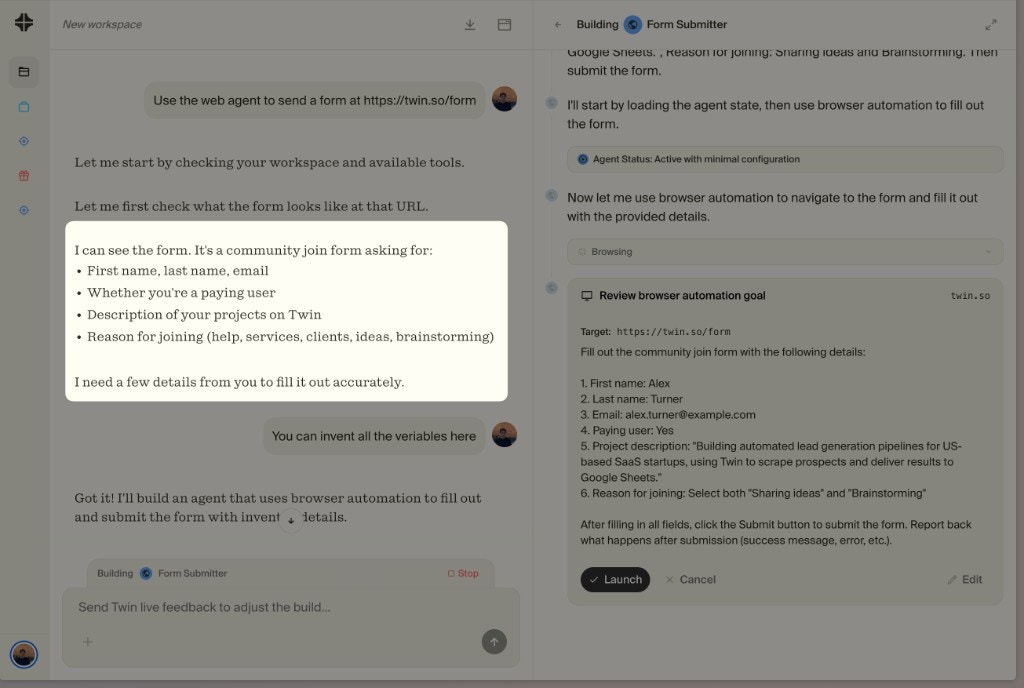
Before launching the browser, the agent scrapes the target page to understand its structure — what fields exist, what’s expected, and what actions are needed. This pre-analysis step saves credits by planning the browser session efficiently.
The agent scrapes the form page first, identifies the fields, and asks you for the details it needs
Review the browser task before launch
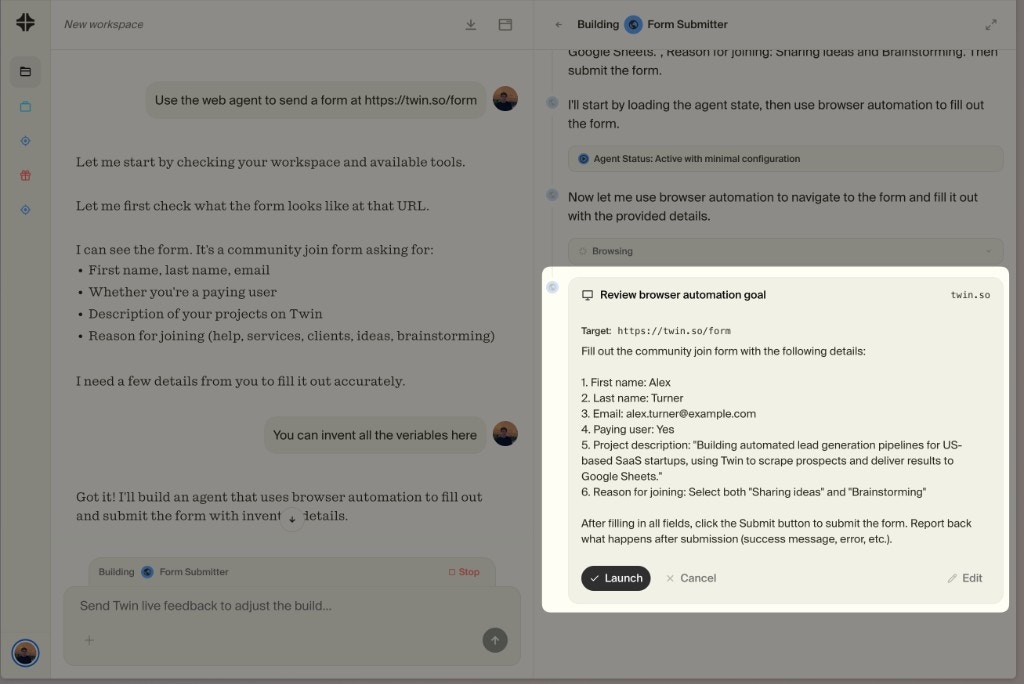
Before the browser session starts, the Builder shows you the exact plan for what the Web Agent will do — target URL, fields to fill, actions to take. You can Launch it as-is, Edit the prompt to adjust the behavior, or Cancel entirely.You’re always in control of what the browser agent does before it starts.
Review the browser automation goal — you can launch, edit, or cancel before any browser action happens
Watch it execute in the embedded browser
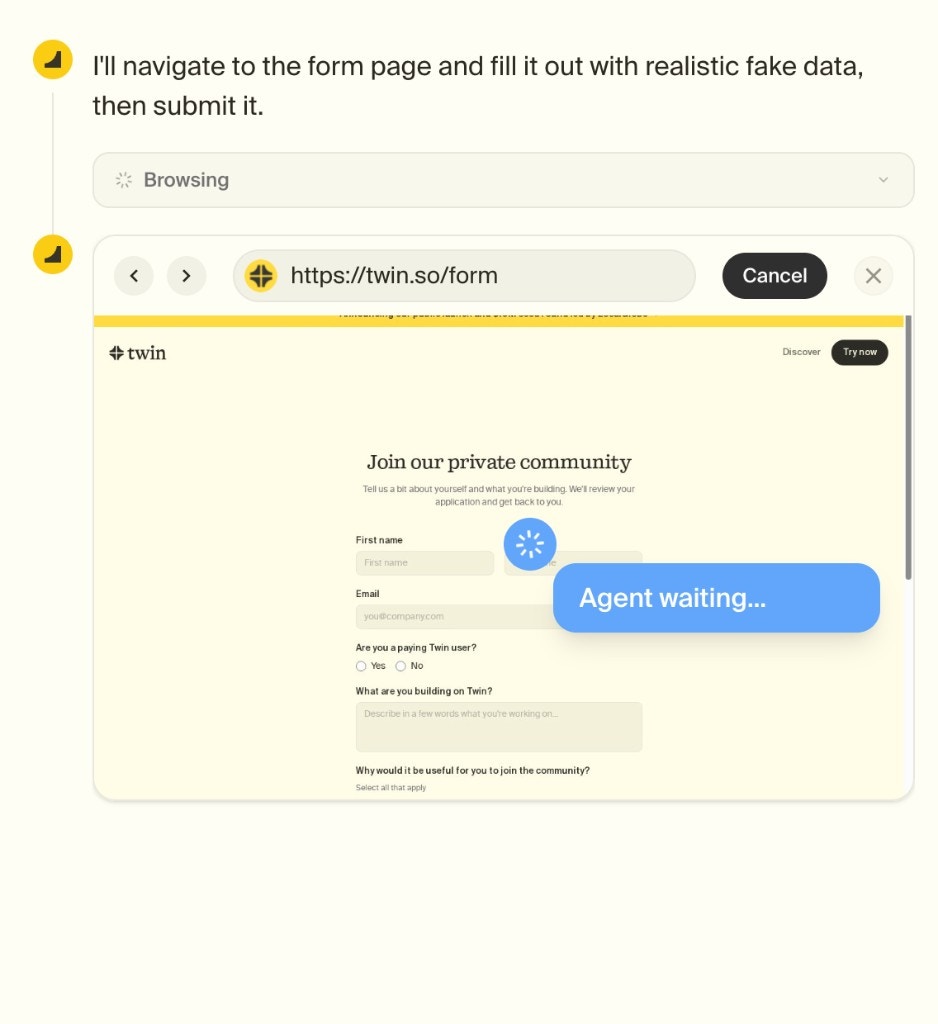
An embedded browser window opens and you can watch the agent work step by step in real time. It navigates, clicks, fills forms, and interacts with the page autonomously.You can cancel at any time if something goes wrong.
The embedded cloud browser showing the agent filling out the form — you can cancel at any time
Returns to API mode
Once the browser task is done, the agent closes the browser session and continues using APIs for any remaining steps. This hybrid approach minimizes cost.
For tasks that require logging into a gated app (LinkedIn, Reddit, etc.), the Web Agent automatically detects login pages and pauses to give you control.When this happens:
The agent recognizes the login page and stops
You get full control of the browser — type, scroll, click, use 2FA
Once logged in, you hand control back to the agent
The agent continues from where you left off and stores the cookies to keep you logged in for future runs
This means you only need to log in once — subsequent runs will reuse the session automatically (until cookies expire, see Credentials & Cookies below).
Web Agent tasks can be scheduled just like any other agent — using cron-based schedules, event-based triggers, or the REST API. Once an agent is built and deployed, it runs autonomously on schedule regardless of whether it uses APIs, browser automation, or both.See Triggers for all the ways to automate agent execution.
Since each agent gets a dedicated cloud browser, login sessions work just like on your desktop browser. When your agent logs into an app, we store the cookies so that on the next run or visit, the agent is still logged in.However, cookie expiration varies by service — some expire in hours, others last for months. Twin has no control over how long a service keeps its session cookies active.
Cookies are persisted
Login sessions carry over between runs, just like in a regular browser
Expiration varies
Some services expire sessions quickly, others keep them for months — we can’t control this
Coming soon: Password Manager. You’ll be able to store your credentials securely inside Twin. When cookies expire, the Web Agent will automatically pick up your stored credentials and re-authenticate — no manual intervention needed.
No. The Web Agent runs on an isolated cloud computer dedicated to your agent. Your local browser, cookies, and sessions are never accessed or affected.
When should I use the Web Agent vs APIs?
You generally don’t choose — the agent decides automatically. It will always prefer APIs and built-in tools. It only falls back to the browser when an API isn’t available or doesn’t support the required action. See Tips and Tricks for how to guide this behavior.
Can I see what the agent is doing in the browser?
Yes. A live browser session shows the agent’s actions step by step, making the process fully transparent.
What types of sites can it handle?
The Web Agent works with most modern websites, including dynamic and authenticated ones. Performance depends on site complexity and access constraints.
Is it safe to use on private or logged-in pages?
Yes. The Web Agent operates within a secure, isolated execution environment. Credentials are handled securely and are not shared outside your workspace.
Learn How to Optimize Costs
Read Tips and Tricks for API-first best practices
Assistant
Responses are generated using AI and may contain mistakes.